Recover Lost Sales with OpenCart Abandoned Cart Reminder Extension

OpenCart Abandoned Cart Reminder Extension
The Purpletree OpenCart Abandoned Cart Reminder Extension helps store owners recover lost sales by automatically sending reminder emails to customers who leave products in their shopping carts without completing the purchase. This extension improves customer engagement, boosts conversion rates, and helps increase revenue for OpenCart eCommerce stores.
How the OpenCart Abandoned Cart Extension Works
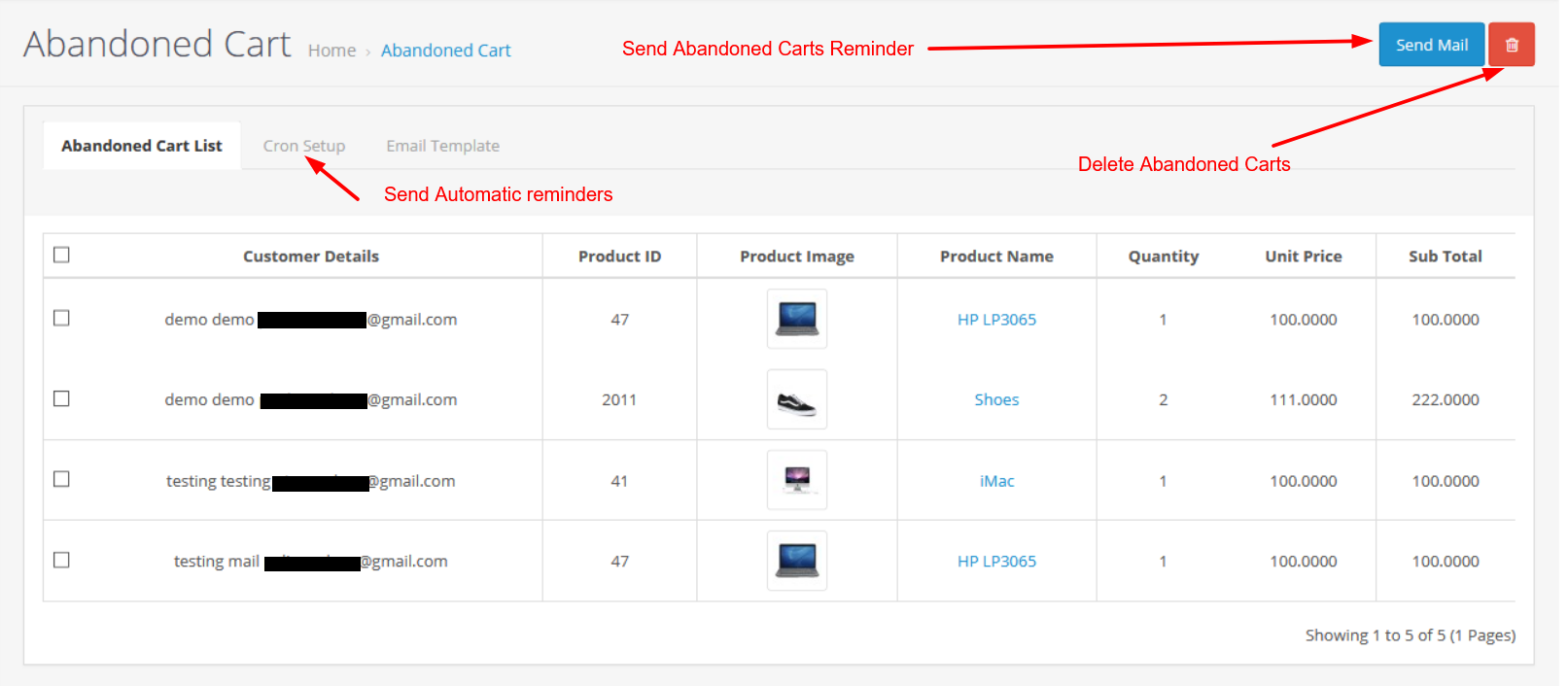
Whenever a customer adds products to the cart and leaves the website without checkout, the extension stores the cart information in the admin panel. The admin can monitor abandoned carts, send reminder emails, and automatically remove old cart data using cron settings.
Track Abandoned Customer Carts
The extension allows store owners to view all abandoned carts directly from the admin panel. Admins can monitor:
- Customer details
- Products added to cart
- Cart value
- Date and time of cart abandonment
Benefits of Cart Tracking
- Identify customers interested in products
- Recover potential lost sales
- Understand customer shopping behavior
- Improve marketing and follow-up strategies
Automatic Abandoned Cart Reminder Emails
The extension automatically sends reminder emails to customers after a specified number of hours. This helps encourage customers to return to the store and complete their purchases.
How to Configure Reminder Emails
- Go to Abandoned Cart → Cron Setup
- Enable Send E-mail 1 Time Only
- Enter hours in Send E-mail after Hours
- Click on the Submit button
Example: If the admin sets 2 hours, customers will receive an abandoned cart reminder email after 2 hours of leaving the cart.
Benefits of Automatic Reminder Emails
- Recover abandoned orders automatically
- Increase store conversion rates
- Boost sales and revenue
- Reduce cart abandonment rate
- Improve customer engagement
- Encourage customers to complete checkout
Automatic Cart Product Deletion
The extension can automatically delete old abandoned cart data after a specific number of hours using cron functionality.
How to Configure Automatic Cart Deletion
- Enable Delete Cart Products
- Enter hours in Delete Cart Products after Hours
- Click on the Submit button
Benefits of Automatic Cart Cleanup
- Keeps database clean and optimized
- Improves website performance
- Removes unnecessary cart records automatically
- Reduces manual admin work
- Helps manage abandoned cart data efficiently
Email Template Customization
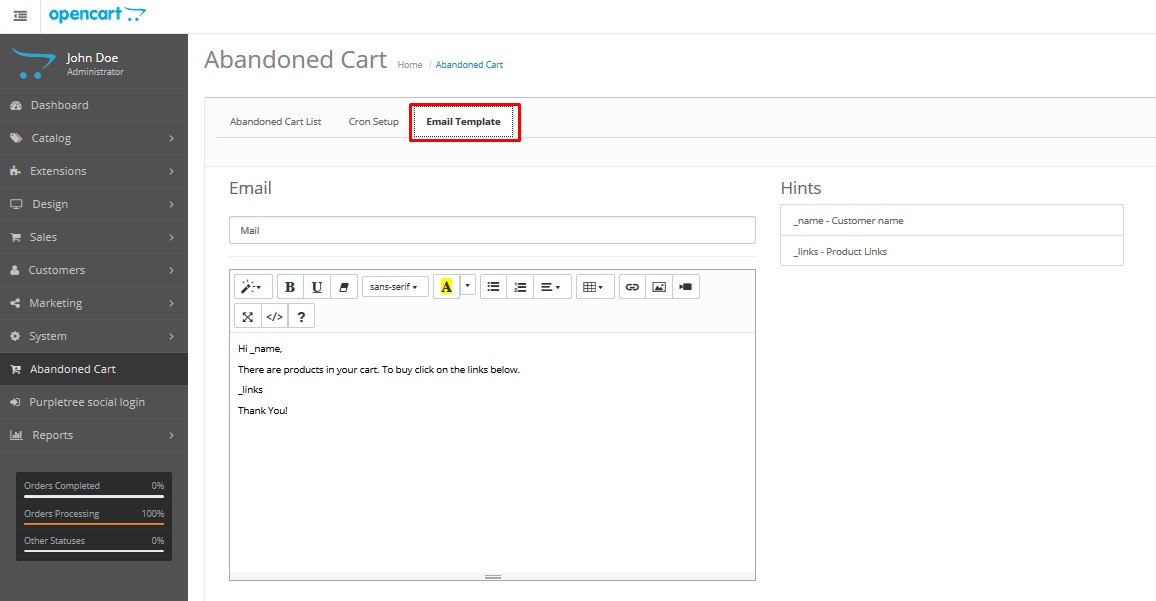
Admins can fully customize the abandoned cart email template according to store branding and marketing requirements.
Important Variables
- _name → Displays customer name
- _links → Displays abandoned product links
Do not modify these variables while editing the email template.
Benefits of Email Template Customization
- Create professional branded emails
- Improve customer trust and engagement
- Add discount offers and coupon codes
- Increase email open and click rates
- Improve abandoned cart recovery performance
Cron Job Setup
Cron setup is required for sending automatic reminder emails and deleting abandoned cart products.
Recommended Cron Frequency
The cron job should run every hour.
Linux Cron Command
0 * * * * curl <URL>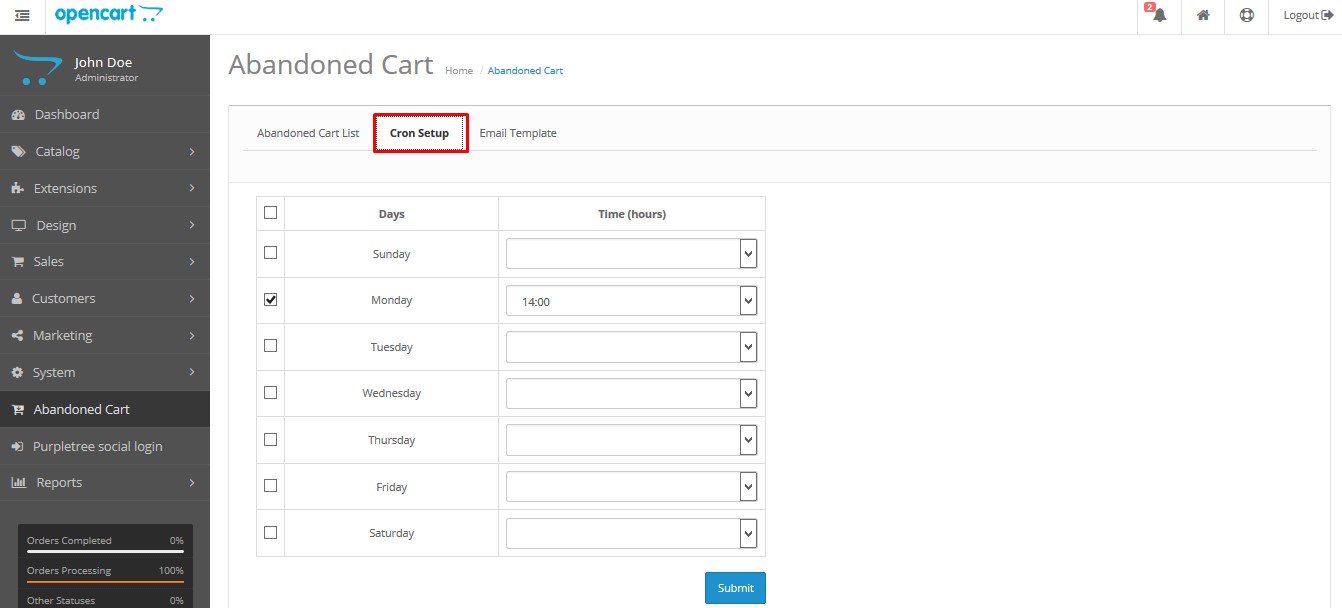
Cron URL Based on OpenCart Version
OpenCart 2.0
<BASEURL>/index.php?route=croncart/croncart/cronvalue
OpenCart 2.1, 2.2 and 2.3
<BASEURL>/index.php?route=cron/cron/cronvalue
OpenCart 3.x
<BASEURL>/index.php?route=extension/cron/cron/cronvalue
Sample Cron URL
http://www.your-website.com/index.php?route=extension/cron/cron/cronvalue
Key Benefits for Your OpenCart eCommerce Store
Recover Lost Revenue
Bring back customers who left products in the cart and recover missed sales opportunities automatically.
Increase Conversion Rates
Reminder emails encourage customers to complete their purchases, helping improve overall store conversions.
Improve Customer Experience
Customers receive helpful reminders and can quickly return to their saved carts without searching for products again.
Save Time with Automation
The extension automates follow-up emails and cart cleanup processes, reducing manual admin effort.
Better Store Management
Track abandoned cart activity and customer behavior directly from the admin panel for better decision-making.
Why Every OpenCart Store Needs an Abandoned Cart Extension
Many customers leave online stores without completing purchases due to distractions, payment issues, price comparisons, or incomplete checkout processes. The Purpletree OpenCart Abandoned Cart Reminder Extension helps recover these potential customers automatically through reminder emails and smart automation.
By using this extension, store owners can significantly reduce abandoned carts, improve customer retention, and increase overall sales performance.