
Opencart Product Label Maker
$29
Note: Available as a one-time-payment solution with lifetime free updates / Source Code.
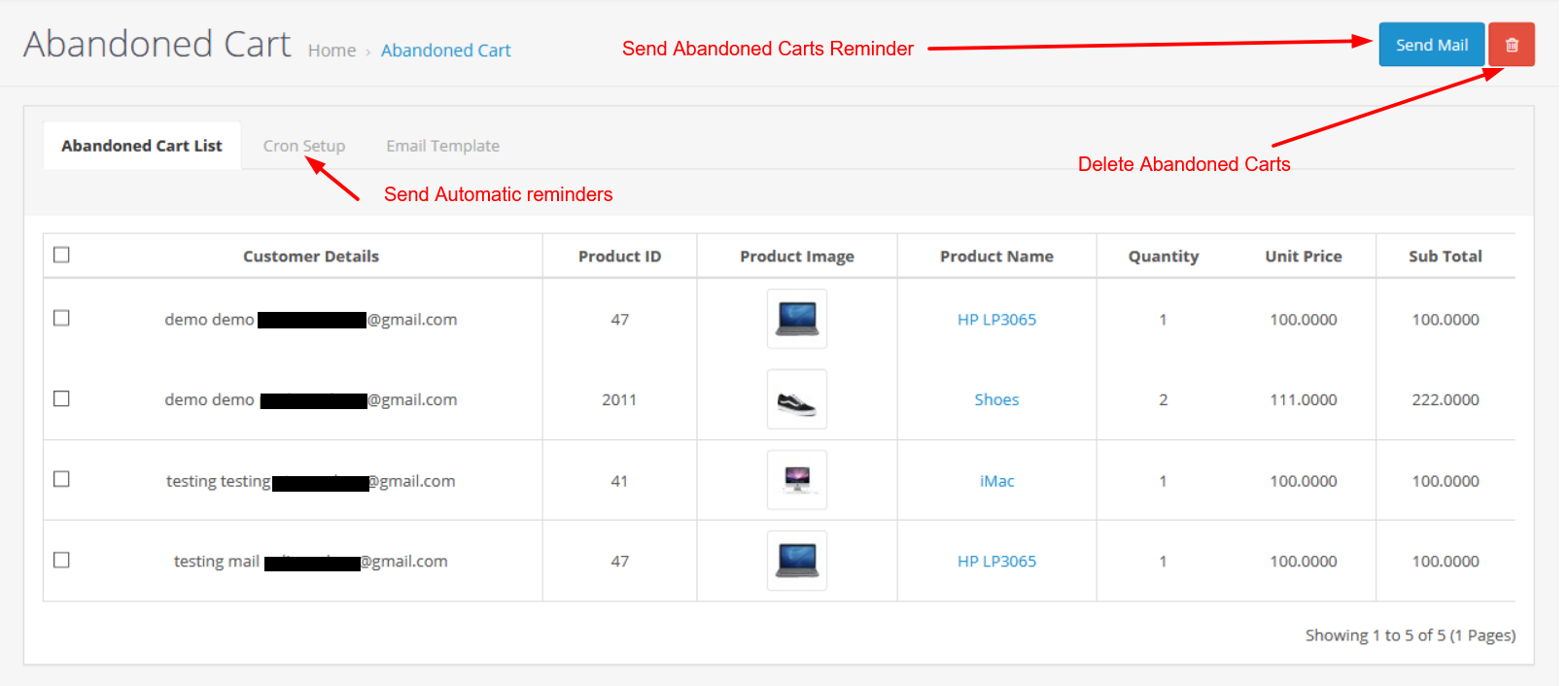
Viewing and Removing Abandoned Carts
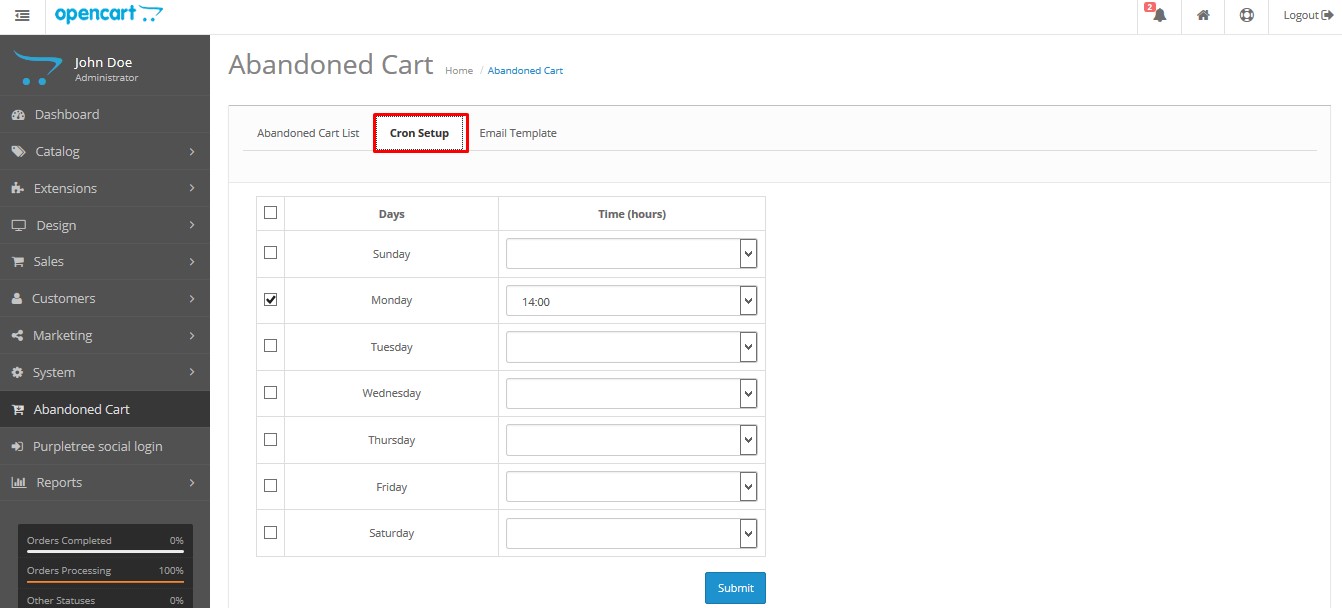
Go to Abandoned Cart in admin to view customers who left products in their cart. You can monitor cart details and configure automatic email reminders or automatic deletion of cart products after a specified number of hours using cron settings.
Cron Settings
To enable automatic email alerts and cart deletion, set up a cron job that runs every hour. Configure the correct cron URL based on your OpenCart version to ensure reminders and cleanup actions work properly.
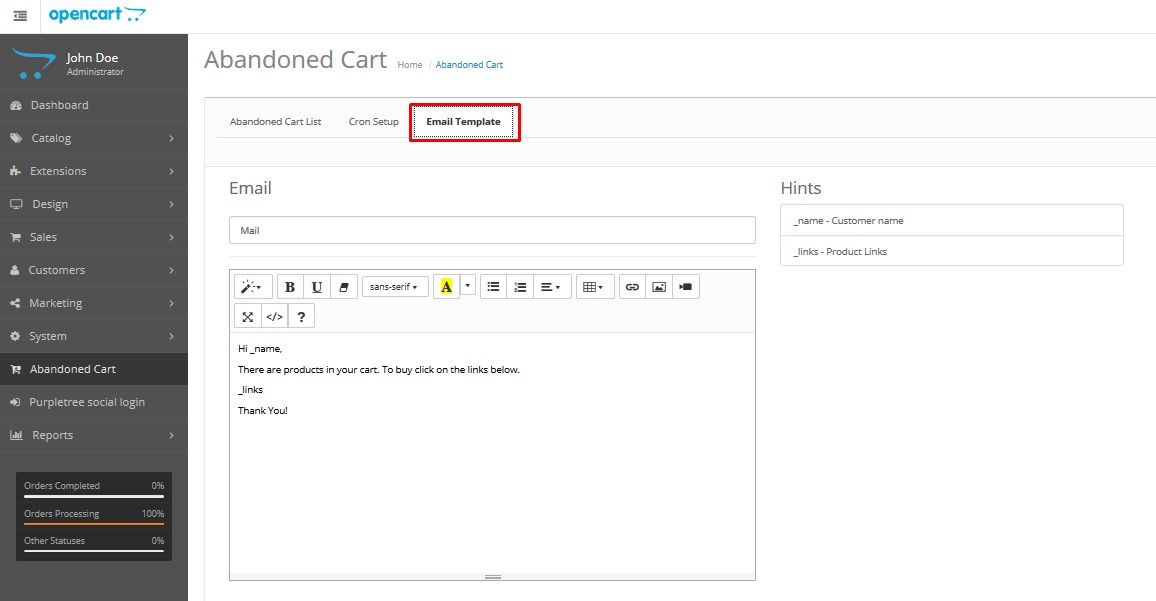
Email Template
You can customize the abandoned cart email from the Email Template section. Do not modify the variables _name and _links, as they are required to display the customer name and cart product links correctly in the email.
An abandoned cart reminder is a feature that sends automated email reminders to customers who have added items to their online shopping cart but have not completed the purchase. This feature is designed to encourage customers to return to the website and complete their purchase. In the context of Opencart, an abandoned cart reminder would be an extension or plugin that can be installed on an Opencart e-commerce website to enable this functionality.
Download the user guide.
In case of any issues, please open a ticket from our helpdesk.
Note: Our extensions have a licensing policy, click here to view the license policy.
The Purpletree OpenCart Abandoned Carts Reminder extension is designed to help you recover lost sales by sending automatic notifications to users who have left products in their shopping carts without completing the purchase.
Works with most themes, including the Journal theme.
The extension automatically sends reminder emails to customers who have abandoned their carts. This helps encourage customers to return to your store and complete their purchases.
As an admin, you can easily configure the schedule for these reminder emails. You can set specific time intervals for when the emails should be sent after a cart is abandoned.
You have full control over the content of the reminder emails. Tailor the messages to suit your brand’s voice and effectively entice customers back to their carts.
Enjoy six months of free technical support to assist you with any issues or questions regarding the extension.
By using this extension, you can significantly reduce the number of abandoned carts and increase your sales revenue by prompting customers to complete their purchases.
Automated cart reminders help re-engage customers and improve conversion rates without manual follow-ups.
Experience the Custom Product Designer firsthand. Try our live demo stores to see how easy and powerful the customization experience can be.
Admin Username: admin
Password: demo123
Supported Opencart Versions:
FAQ – Abandoned Cart Reminder Extension
Follow these steps:
Follow these steps:
Automatic cart product email alert and automatic cart deletion are not available for OpenCart 2.0 version.
Important: Do not change _name and _links.
Setting a cron job is required for sending abandoned cart email notifications.
0 * * * * curl
OpenCart 2.0
OpenCart 2.1, 2.2, 2.3
OpenCart 3.x
http://www.your-website.com/index.php?route=extension/cron/cron/cronvalue