How to Enable Email OTP Verification in OpenCart with Purpletree Extension

In today's digital commerce landscape, security and trust are the cornerstones of successful e-commerce transactions. Whether you're onboarding a new client, approving a bulk order, or verifying checkout details, ensuring the identity of the user is crucial.
If you are using OpenCart, you just need this plugin—Email OTP verification. Let’s understand the full scope of this functionality and how it benefits your business.
What Is Email OTP Verification?
Email OTP (One-Time Password) Verification is a method where a verification code is sent to a user's registered email address. This code must be entered by the user to complete critical actions such as:
-
Logging into the account
-
Completing checkout
-
Registering a new account
With Purpletree’s extension, this feature is already integrated and configurable — no additional purchase required.
Steps to Enable Email OTP in Purpletree Extension
Here’s how you can enable Email OTP in your OpenCart admin:
1. Customer Login via Email OTP
-
Navigate to:
SMS Verification > Customer Login -
Select the option:
Login with email id using OTP verification -
Choose
E-Mailas the medium to receive OTP. -
Define your OTP message template like:
The verification code is: _CODE_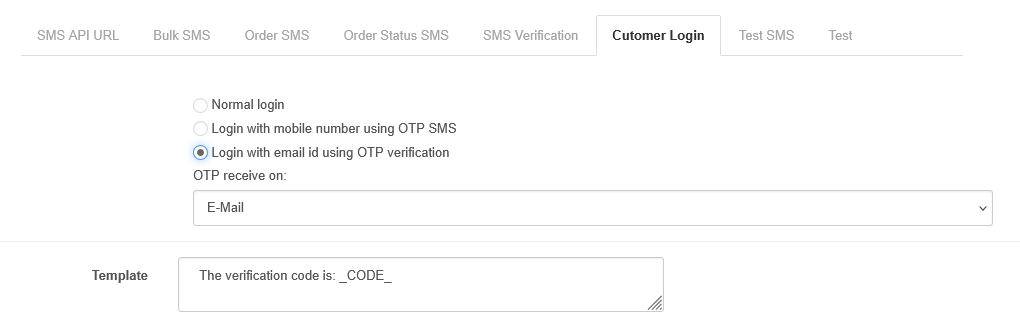
2. OTP on Checkout
-
Go to:
SMS Verification > SMS Verification Tab -
Set
Verification on checkouttoYes -
Choose applicable payment methods (or select
All) -
Provide a template:
Your verification code is _OTP_.
3. OTP on Registration
-
Set
Verification on registrationtoYes -
Set
Verification forasE-Mail -
Provide a message template as above
Note: The system dynamically replaces _OTP_ or _CODE_ with the actual one-time password and sends it via email.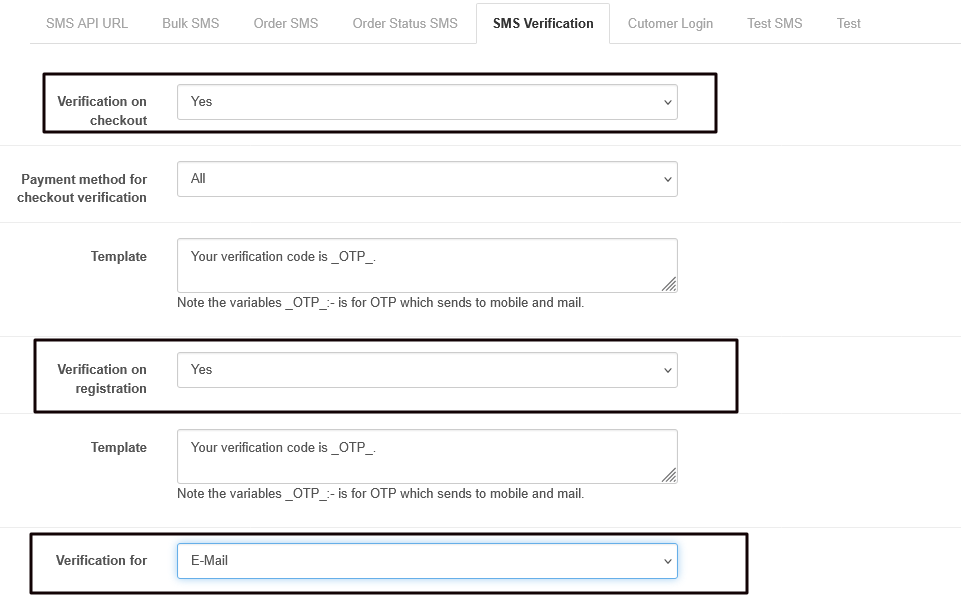
B2B Benefits of Email OTP Verification
Here’s why Email OTP is particularly beneficial for B2B stores:
1. Improved Account Security
Minimize risks from shared credentials or phishing. Each login or checkout must be verified by a one-time code sent to the verified business email.
2. Better Authentication in Multi-User Environments
B2B platforms often have accounts managed by multiple employees. OTP ensures each action is verified by an authorized user.
3. Faster Onboarding with Fewer Delays
New user registrations are instantly verified via email without needing mobile numbers or manual approvals.
4. Reduced Cart Abandonment
Email ensures faster and more reliable delivery, reducing drop-offs.
5. Cost-Effective
Unlike SMS, email OTPs don’t incur per-message charges — an ideal choice for high-volume B2B orders or repeated verifications.
Important Advisory
If you already use Purpletree’s SMS OTP Extension, do not purchase another plugin for email OTP verification.
This functionality is already included and can be activated as shown in the steps above.
Conclusion
By using the built-in Email OTP feature in the Purpletree OTP Extension, you not only strengthen your store's security but also improve the experience for your B2B customers — without extra costs.
Want to streamline verification for your B2B store? Just configure the settings and start verifying with confidence.