

eCommerce Website Technical Guide: A Beginner's Introduction to Managing an Online Store

Starting an online business is easier than ever. Today, anyone can launch an eCommerce website and sell products to customers across the world. However, running an online store involves more than simply uploading products and accepting orders.
To manage an eCommerce website successfully, you should understand some basic technical concepts, including servers, databases, frontend, backend, hosting, domains, payment gateways, and website administration.
You do not need to become a programmer or software developer to manage an online store. However, understanding how these components work will help you communicate with developers, manage your website efficiently, troubleshoot common issues, and make better business decisions.
This guide explains the basic technical terminology of eCommerce websites in simple language, especially for beginners, traders, business owners, and online sellers.
1. What Is an eCommerce Website?
An eCommerce website is an online platform where businesses sell products or services through the internet. Customers can browse products, check prices, add items to their shopping cart, place orders, and make online payments.
Examples of eCommerce Websites
- Amazon – Online marketplace for multiple sellers.
- Flipkart – Online shopping platform.
- Shopify Stores – Independent online shopping websites.
- Brand Websites – Businesses selling their own products directly.
How Does an eCommerce Website Work?
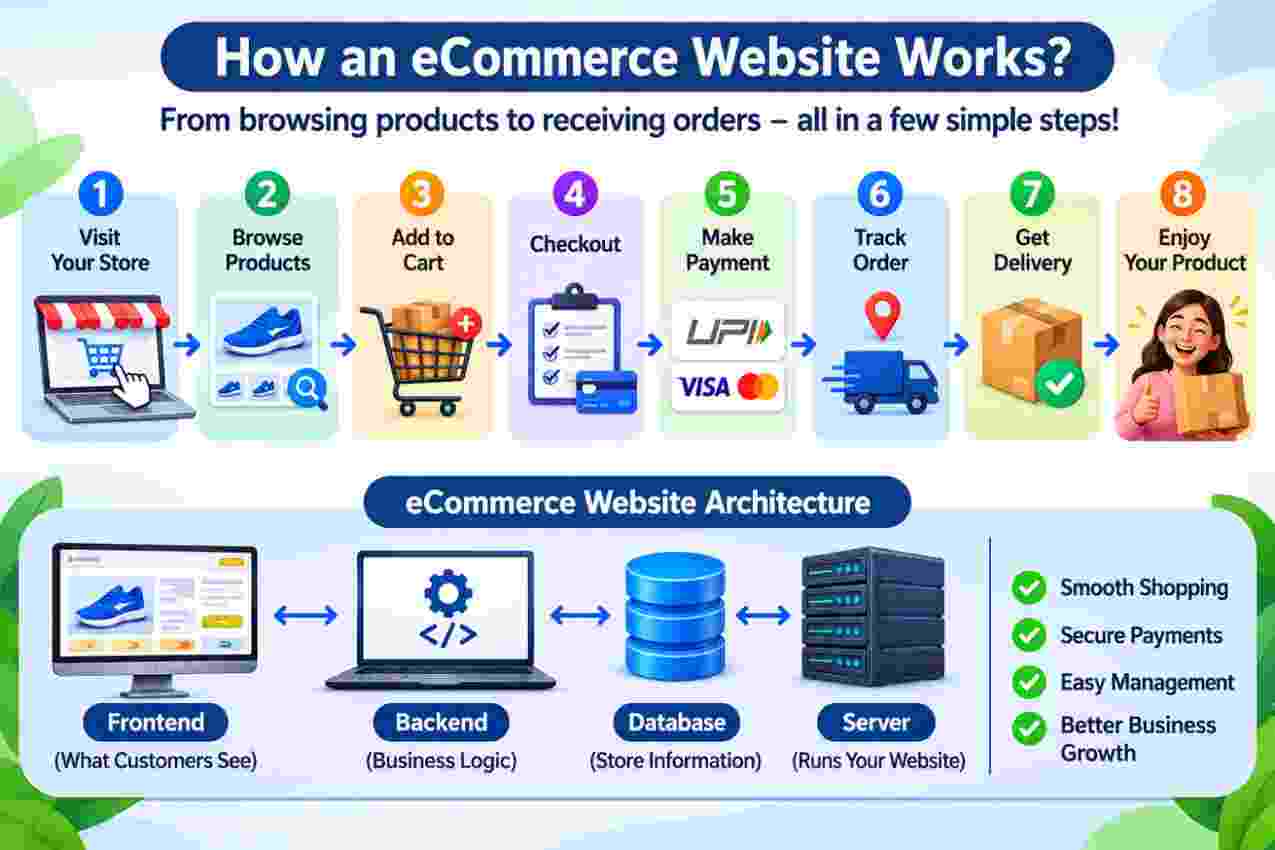
A typical online shopping process works as follows:
- A customer visits your website.
- The customer browses product categories.
- The customer opens a product page.
- The customer adds a product to the shopping cart.
- The customer enters shipping and billing information.
- The customer completes payment or selects Cash on Delivery.
- The website creates an order.
- The store administrator processes and ships the order.
- The customer receives the product.
2. Understanding the Basic Structure of an eCommerce Website
An eCommerce website consists of several technical components that work together. Understanding these components is the first step towards managing your online business.
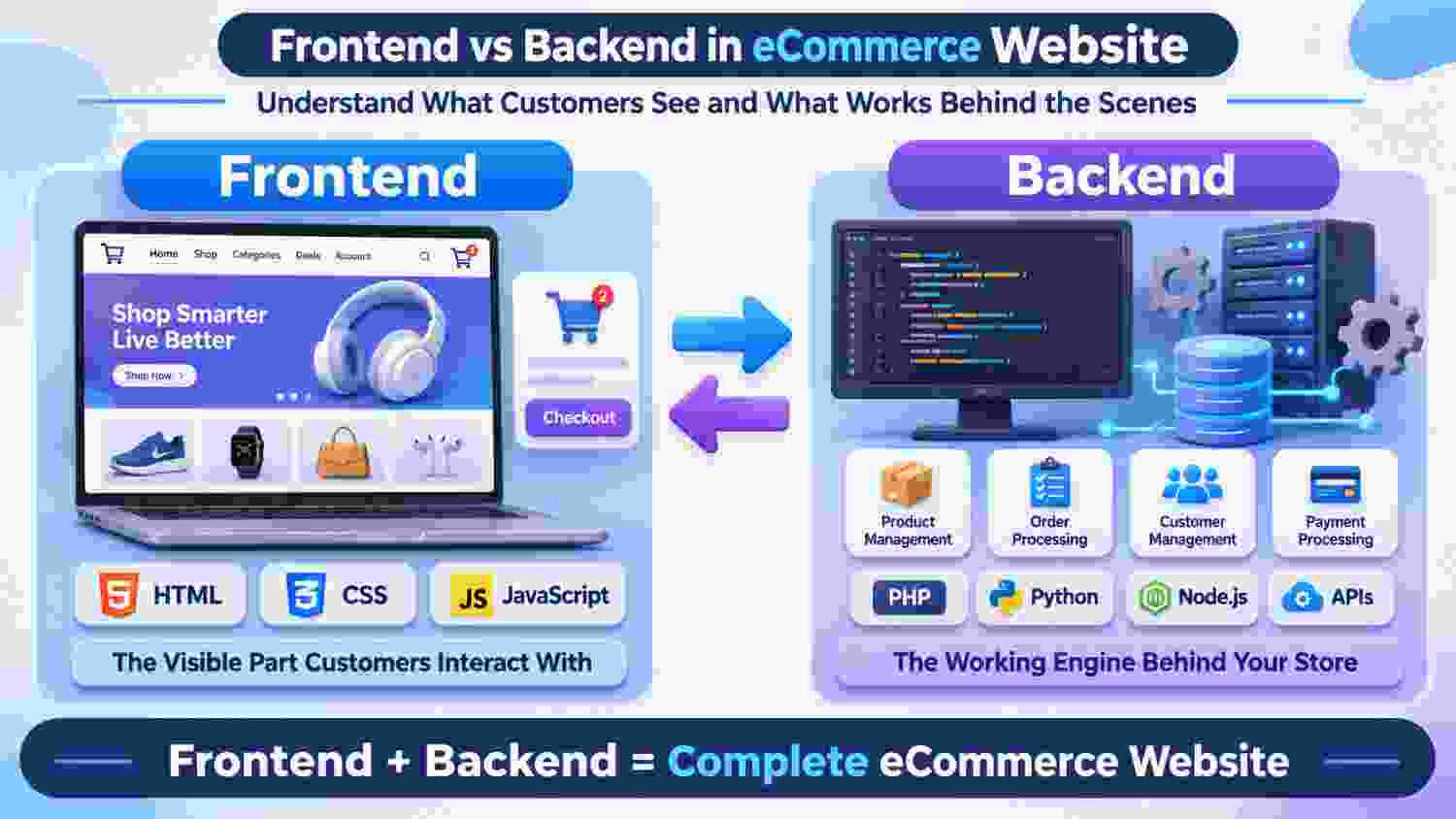
2.1 Frontend – What Customers See
Frontend refers to the visible part of a website that customers interact with. Whenever someone visits your online store, they are using its frontend.
Frontend Includes:
- Homepage
- Product listing pages
- Product images and descriptions
- Navigation menus
- Shopping cart
- Checkout page
- Login and registration pages
- Contact and information pages
Technologies Used in Frontend Development
- HTML – Creates the structure of website pages.
- CSS – Controls website design, colors, spacing, and layout.
- JavaScript – Adds interactive features and functionality.
- Bootstrap – Helps developers create responsive website layouts.
Example
When a customer clicks the Add to Cart button, views a product image, or opens a navigation menu, they are interacting with the frontend.
2.2 Backend – The Working Engine of Your Website
Backend is the technical part of a website that works behind the scenes. Customers generally cannot see it directly.
The backend handles the business logic and processes the information submitted through the frontend.
Backend Includes:
- Customer account management
- Product management
- Order processing
- Payment processing integration
- Inventory management
- Shipping calculations
- Discount and coupon management
- Admin user permissions
Common Backend Technologies
- PHP
- Python
- Node.js
- Java
- Laravel
Example
When a customer places an order, the backend validates the order details, communicates with the database, processes the payment response, and saves the order information.
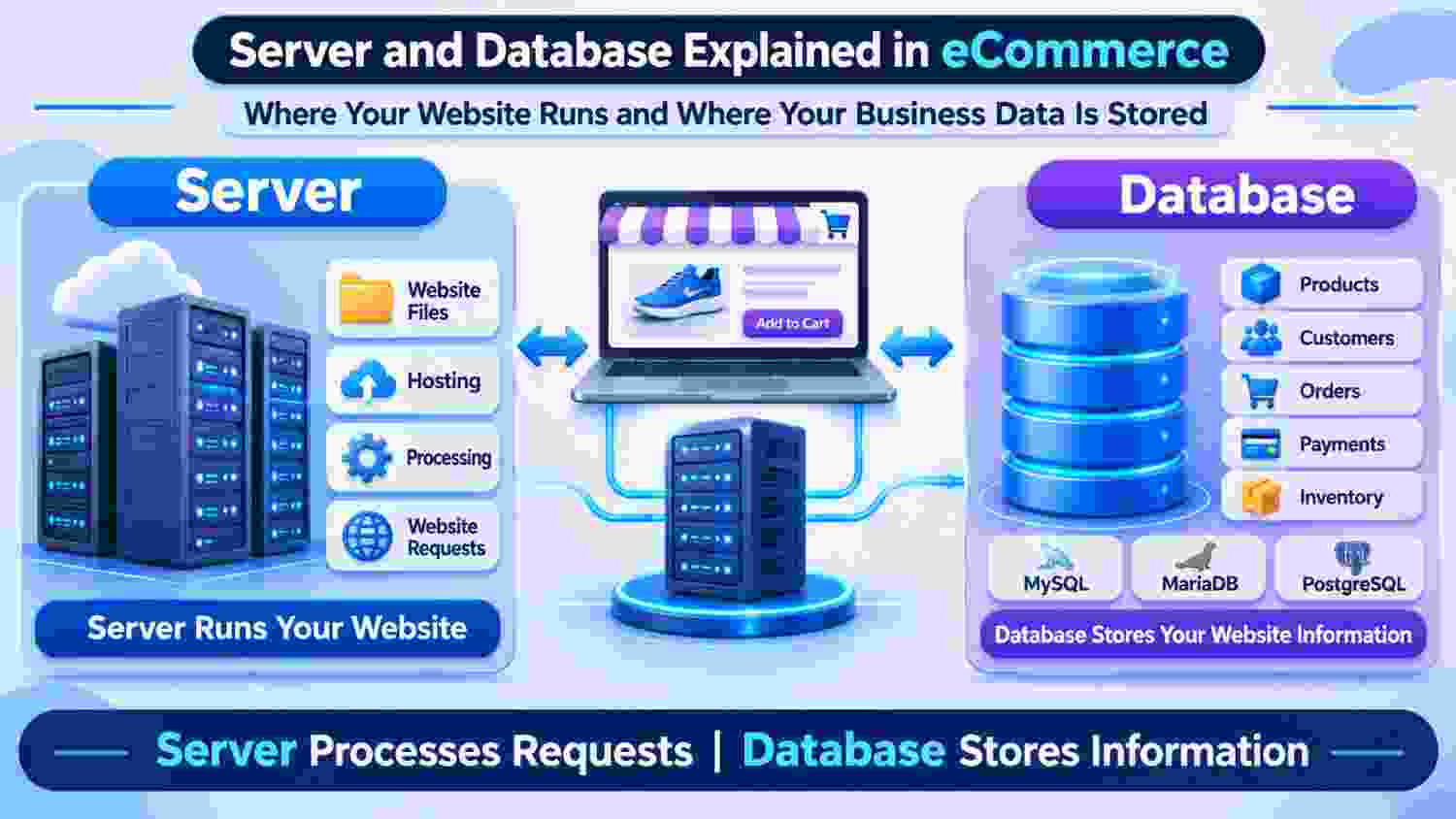
2.3 Database – Where Website Information Is Stored
A database is an organized storage system that keeps important information about your online store.
Think of a database as a digital register that stores your business information and makes it available whenever your website needs it.
What Information Is Stored in a Database?
- Product names and descriptions
- Product prices
- Product stock quantities
- Customer names and account information
- Customer addresses
- Order details
- Payment transaction references
- Discount codes
- Website configuration settings
Popular Database Systems
- MySQL
- MariaDB
- PostgreSQL
- MongoDB
Example
Suppose you sell a mobile phone for ₹15,000. Its name, price, description, product ID, and stock quantity may be stored in your website database. When a customer places an order, the website retrieves and updates the relevant information.
2.4 Server – The Computer That Runs Your Website
A server is a computer or computing system that stores and processes your website files and responds to requests from visitors.
When someone visits your website, their browser sends a request to your server. The server processes that request and sends the required webpage or information back to the visitor.
What Does a Server Do?
- Stores website files.
- Runs website software.
- Connects to the database.
- Processes customer requests.
- Handles website traffic.
- Supports online transactions.
Types of Hosting Servers
- Shared Hosting – Multiple websites share the same server resources.
- VPS Hosting – A virtual private server provides allocated resources.
- Dedicated Server – An entire physical server is assigned to one customer.
- Cloud Hosting – Website resources run across cloud infrastructure.
Example
Imagine your eCommerce website receives 10,000 visitors during a festival sale. Your server must have enough resources to handle the traffic without making the website slow or unavailable.
3. Important Website Infrastructure Terminology
3.1 Domain Name
A domain name is the internet address customers use to access your website.
Example: www.yourstore.com
You register a domain through a domain registrar. A domain is different from website hosting: the domain is your website's address, while hosting provides the infrastructure where your website operates.
3.2 Web Hosting
Web hosting is a service that provides server resources to store and run your website.
Without suitable hosting, your website cannot be accessed publicly on the internet.
3.3 DNS (Domain Name System)
DNS connects your domain name to the correct server address. It works like an internet phonebook, helping browsers find the server associated with your domain.
3.4 SSL Certificate
SSL/TLS certificates enable secure HTTPS connections between your website and visitors.
Look for the HTTPS prefix and padlock indicator in your browser. SSL/TLS helps protect information transmitted between customers and your website.
3.5 IP Address
An IP address is a numerical address used to identify a device or server on a network.
Example: 192.0.2.1
3.6 Bandwidth
Bandwidth refers to the capacity of a network connection to transfer data over a period of time. Hosting providers may also use monthly data transfer limits.
3.7 Storage Space
Storage is the disk space available for website files, product images, documents, backups, and other data.
4. Understanding the Website Admin Panel
The admin panel is the control centre of your eCommerce website. Store owners and authorized employees use it to manage daily business operations.
4.1 Dashboard
The dashboard provides an overview of important store activities, such as total orders, revenue, customers, and sales statistics.
4.2 Product Management
This section allows you to add, edit, and remove products from your online store.
Important Product Fields
- Product Name
- SKU (Stock Keeping Unit)
- Product Model
- Product Price
- Special Price
- Product Images
- Product Description
- Category
- Manufacturer or Brand
- Quantity or Stock
- Product Status
4.3 Category Management
Categories help organize products into groups so customers can easily find what they want.
Example: Electronics → Mobile Phones → Smartphones.
4.4 Order Management
Order management helps you track customer purchases and process them efficiently.
Common Order Statuses
- Pending
- Processing
- Shipped
- Complete
- Cancelled
- Refunded
4.5 Customer Management
This section allows store administrators to view customer accounts, addresses, order history, and other permitted customer information.
4.6 Inventory Management
Inventory management helps you monitor product stock and avoid selling products that are unavailable.
4.7 Coupon and Discount Management
You can create promotional offers using discount percentages, fixed discounts, coupon codes, and special pricing rules.
4.8 Shipping Management
Shipping settings help configure delivery methods, shipping charges, delivery zones, and courier integrations.
4.9 Payment Management
This section allows you to configure payment methods such as UPI-enabled payment gateways, debit cards, credit cards, net banking, wallets, and Cash on Delivery.

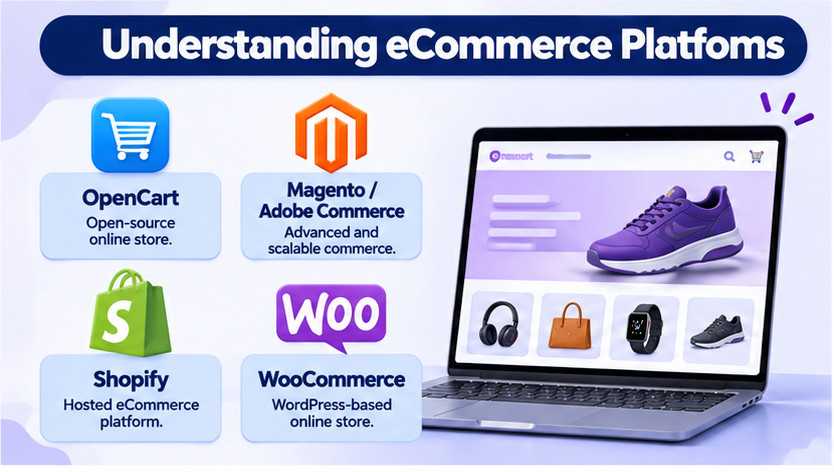
5. Understanding eCommerce Platforms
An eCommerce platform is software used to create and manage an online shopping website.
5.1 OpenCart
OpenCart is an open-source eCommerce platform that allows businesses to create and manage online stores. It provides product management, order management, customer management, and extension-based customization.
5.2 Magento / Adobe Commerce
Magento, now part of Adobe Commerce, is a powerful eCommerce platform designed for businesses requiring advanced customization, complex product structures, and scalable commerce operations.
5.3 Shopify
Shopify is a hosted eCommerce platform that allows businesses to build and manage online stores without managing their own application server infrastructure.
5.4 WooCommerce
WooCommerce is an eCommerce plugin for WordPress. It converts a WordPress website into an online shopping store.
6. Understanding Extensions, Modules, and Plugins
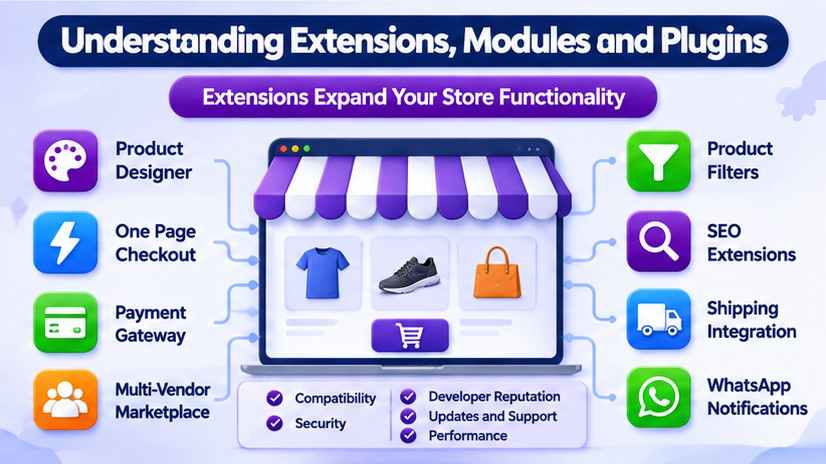
Extensions, modules, and plugins are additional software components that introduce new features or modify existing functionality.
Examples of eCommerce Extensions
- Advanced Product Designer
- One Page Checkout
- Payment Gateway Integration
- Multi-Vendor Marketplace
- Product Filters
- SEO Extensions
- Shipping Integration
- WhatsApp Notifications
Why Are Extensions Important?
Extensions allow you to expand your store functionality without developing every feature from scratch.
Important Things to Check Before Installing an Extension
- Platform and version compatibility.
- Developer reputation.
- Installation instructions.
- Support and update availability.
- Security and performance considerations.
- Compatibility with your existing theme and extensions.
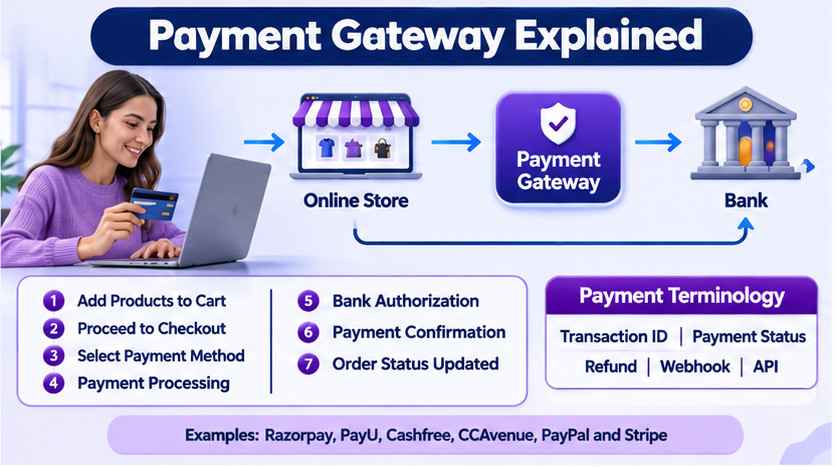
7. Payment Gateway – How Online Payments Work
A payment gateway is a service that helps your website securely communicate payment information and process online transactions.
Popular Payment Gateway Examples
- Razorpay
- PayU
- Cashfree Payments
- CCAvenue
- PayPal
- Stripe
How Does a Payment Gateway Work?
- The customer adds products to the cart.
- The customer proceeds to checkout.
- The customer selects a payment method.
- The payment gateway processes the payment request.
- The bank or payment network authorizes or declines the transaction.
- The payment gateway sends the result to the website.
- The website updates the order status according to the verified payment result.
Important Payment Terminology
- Transaction ID – A unique reference for a payment transaction.
- Payment Status – Indicates whether a payment is pending, successful, or failed.
- Refund – Money returned to a customer.
- Webhook – An automatic message sent by one system to another when an event occurs.
- API – A way for different software applications to communicate.
8. API – How Different Systems Communicate
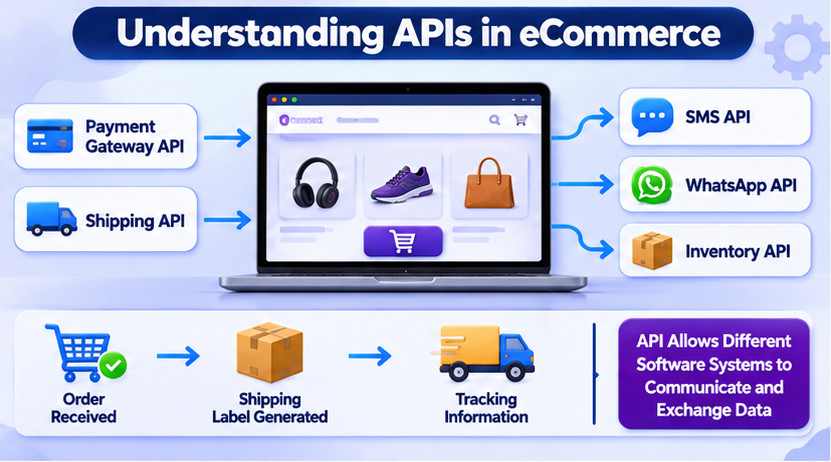
API stands for Application Programming Interface. It allows two different software systems to communicate and exchange information.
Examples of APIs in eCommerce
- Payment gateway API – Connects your website with payment services.
- Shipping API – Connects your store with courier companies.
- SMS API – Sends order notifications to customers.
- WhatsApp API – Supports automated customer communication.
- Inventory API – Synchronizes product stock between systems.
Example
When a customer places an order, your website can communicate with a courier service through its API to generate a shipping label and obtain tracking information.
9. Understanding Website Security
Website security is essential for protecting your business, customers, and online transactions.
Important Security Practices
- Use strong and unique admin passwords.
- Enable two-factor authentication wherever available.
- Keep your platform and extensions updated.
- Use HTTPS with a valid SSL/TLS certificate.
- Take regular website and database backups.
- Give employees only the permissions they need.
- Use trusted payment gateway integrations.
- Monitor suspicious login attempts.
- Remove unused extensions and administrator accounts.
What Is a Website Backup?
A backup is a copy of your website files and database that can be used to restore your website after accidental deletion, technical failure, or a security incident.
Types of Backup
- Full Backup – A complete copy of website files and database.
- Database Backup – A copy of website database information.
- File Backup – A copy of website files, images, and application code.
Always store backups securely and test whether they can actually be restored.
10. Website Performance and Speed
Website speed affects customer experience, conversions, and search engine performance. A slow website may cause customers to leave before completing their purchases.
Factors That Affect Website Speed
- Server performance
- Large product images
- Too many extensions
- Unoptimized code
- Database performance
- External scripts
- Network connectivity
Ways to Improve Website Performance
- Compress product images.
- Use browser and server caching where appropriate.
- Optimize database queries.
- Use a Content Delivery Network (CDN).
- Remove unnecessary extensions.
- Choose suitable hosting resources.
- Monitor website performance regularly.
What Is a CDN?
CDN stands for Content Delivery Network. It distributes website content across multiple servers in different geographical locations to deliver content efficiently to visitors.
11. Understanding SEO for eCommerce Websites
SEO stands for Search Engine Optimization. It refers to improving your website so that search engines can discover, understand, and display your pages in relevant search results.
Important eCommerce SEO Terminology
Meta Title
The title of a webpage that may appear as the clickable headline in search engine results.
Meta Description
A short summary of a webpage that search engines may use in search results.
URL
URL stands for Uniform Resource Locator. It is the address of a specific webpage.
Keywords
Words and phrases that people use when searching for products or information.
Alt Text
Alternative text describes an image and helps search engines and accessibility tools understand its content.
XML Sitemap
A file that helps search engines discover important website URLs.
Robots.txt
A file that provides instructions to search engine crawlers about which website paths they may or may not access.
12. What Is a Website Theme or Template?
A theme or template controls the appearance and layout of your eCommerce website.
Common Theme Elements
- Header and footer
- Homepage layout
- Product listing layout
- Product detail page design
- Navigation menu
- Typography and colors
- Mobile responsive layout
What Is Responsive Design?
Responsive design means that your website automatically adjusts its layout to different screen sizes, including desktops, tablets, and mobile phones.
13. Understanding Common Technical Errors
While managing an online store, you may occasionally encounter technical errors. Knowing their basic meaning helps you explain the issue to your developer or hosting provider.
Common HTTP Status Codes
Error 404 – Page Not Found
The requested webpage could not be found on the server.
Error 403 – Forbidden
The server understood the request but refused access.
Error 500 – Internal Server Error
A general server-side error prevented the request from completing.
Error 502 – Bad Gateway
A server acting as a gateway or proxy received an invalid response from another server.
Error 503 – Service Unavailable
The server is temporarily unable to handle the request, possibly due to maintenance or overload.
Other Common Technical Terms
Cache
Temporary stored information that helps a website load faster.
Debugging
The process of identifying and fixing software problems.
Log Files
Records of website activities, requests, warnings, and errors that help developers investigate problems.
Maintenance Mode
A temporary website state used while performing updates or maintenance.
14. Daily eCommerce Website Management Tasks
Managing an online store requires regular monitoring of products, orders, customers, payments, and website performance.
Daily Tasks
- Check new customer orders.
- Verify payment statuses.
- Update order processing and shipping statuses.
- Check product stock availability.
- Respond to customer enquiries.
- Review failed transactions.
- Check whether the website is working properly.
Weekly Tasks
- Review sales reports.
- Check low-stock products.
- Review website speed.
- Check customer feedback.
- Review discounts and promotional campaigns.
- Check website error logs.
Monthly Tasks
- Review website backups.
- Check software and extension updates.
- Review hosting resource usage.
- Check security settings.
- Analyze sales and conversion reports.
- Review SEO performance. </