Understanding the Commission System in Purpletree Multivendor Marketplace for Magento 2

The Purpletree Multivendor Marketplace extension for Magento 2 offers a comprehensive and flexible commission system that allows store administrators to earn revenue from vendor sales.
This guide explains the three types of commissions, how they work, how to set them up, and how the system determines which one to apply during transactions.
Overview of the Commission System
With the Purpletree extension, store administrators can:
-
Collect commission from each product sold by vendors.
-
Configure commissions at three levels: Category, Vendor, and Global.
-
Can make seller payouts after deducting the admin's commission.
Example
If a seller lists a product for $100 and the admin has set a 20% commission, then:
-
The admin receives $20
-
The seller receives $80
Discover the complete capabilities of Purpletree Magento 2 Multivendor Marketplace.
Types of Commission in Purpletree Marketplace
There are three types of commission you can configure:
-
Category-Wise Commission
-
Vendor-Wise Commission
-
Global Commission
Each type serves a different use case and can be configured through the Magento admin panel.
1. Category-Wise Commission
What is Category Commission?
Category commission allows you to set different commission rates for different product categories. This is useful when certain categories offer higher margins or require different fee structures.
Use Case
-
Electronics: 30% commission
-
Fashion: 10% commission
If a product is listed in the Electronics category, the admin will earn 30% commission from its sale.
How to Set It
-
Log in to the Magento Admin Panel.
-
Navigate to:
Marketplace > Category Commission -
Click Add or Edit Commission
-
Enter the commission percentage.
-
Select the appropriate main category from the category tree.
Note:
The commission is only applied if the product is listed in the selected parent category. It will not apply if the product is in a subcategory.
Example:
If a 20% commission is set for the "Women" category, it will only apply to products listed directly under "Women", not to those under its subcategories like "Tops", "Jackets", or "Bottoms".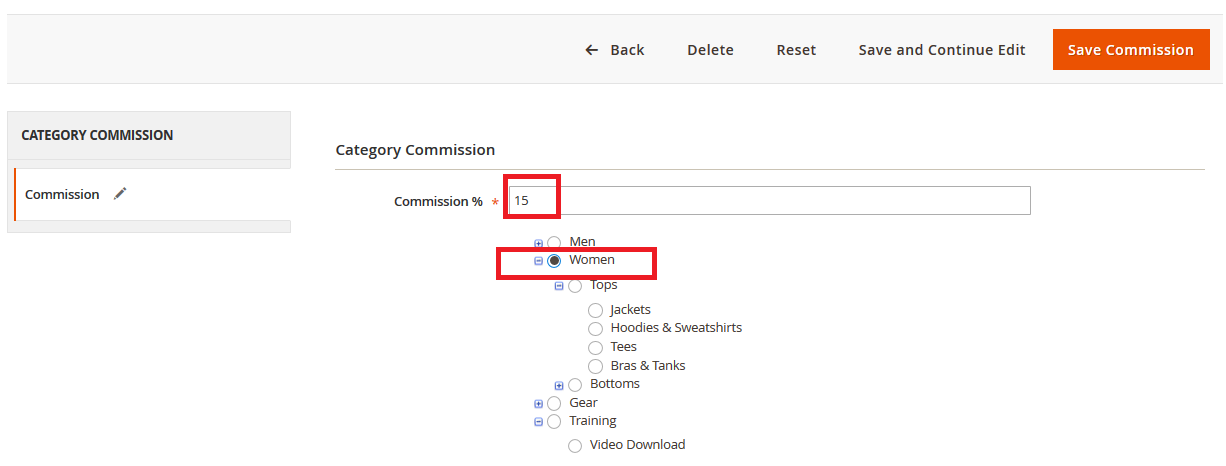
2. Vendor-Wise Commission
What is Vendor Commission?
Vendor-wise commission allows the admin to assign different commission percentages to each seller. This provides flexibility to incentivize or negotiate terms individually with vendors.
Use Case
-
Vendor A: 10% commission
-
Vendor B: 20% commission
Each seller can have a custom commission rate based on your business terms.
How to Set It
-
Go to:
Marketplace > Manage Sellers -
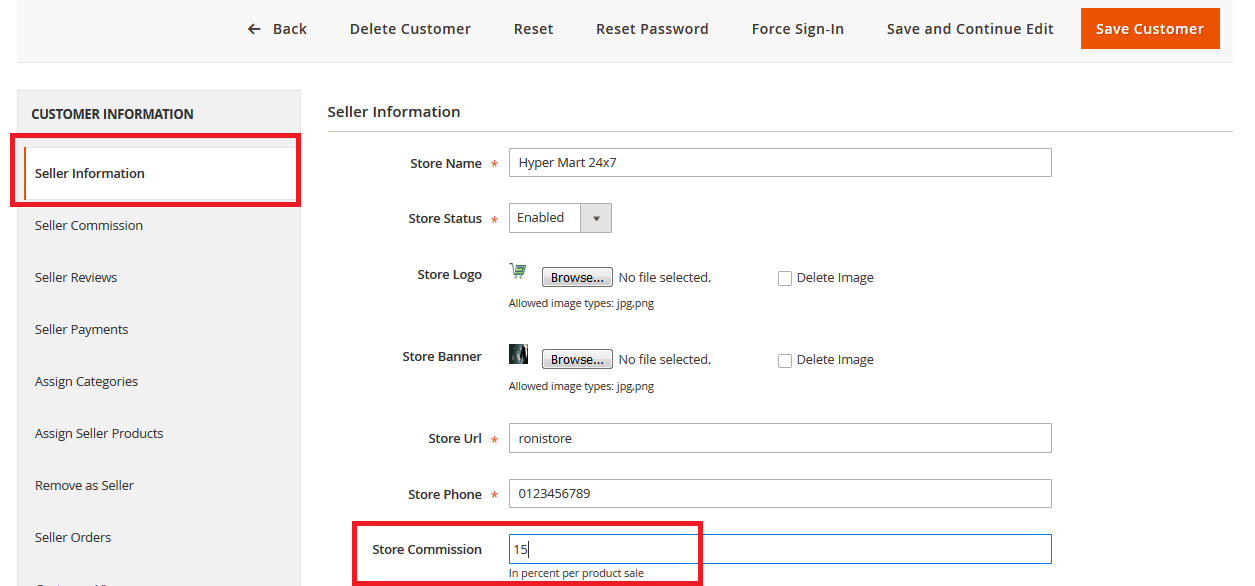
Click Edit next to the desired seller.
-
Under the Seller Information tab, enter the percentage in the Store Commission textbox.
3. Global Commission
What is Global Commission?
The global commission is a default percentage applied to all seller products, regardless of category or individual vendor settings. This is ideal for stores using a simple, uniform commission model.
Use Case
Apply a flat 15% commission across the entire marketplace.
How to Set It
-
Go to:
Marketplace > Settings > Configuration -
Under General Configuration, locate the Set Commission field.
-
Enter the global commission percentage.
Once configured, this commission will be applied to all seller products unless a more specific commission is set at the category or vendor level.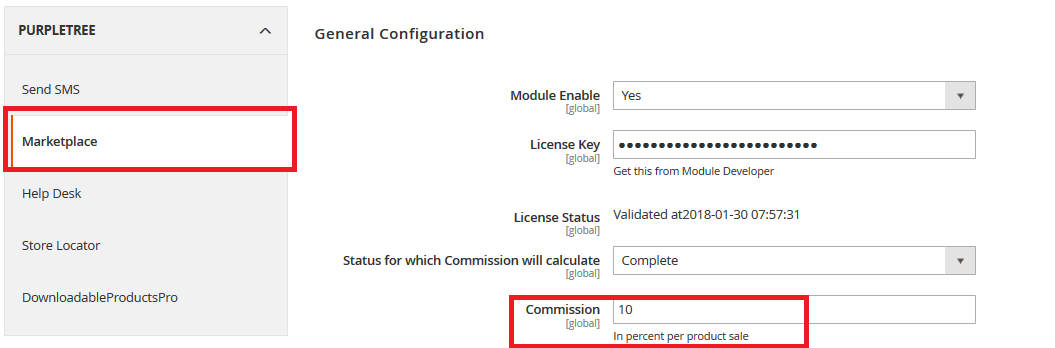
Commission Application Priority
When a product is sold, the system checks which commission applies in the following order:
-
Category Commission – Highest priority
-
Vendor Commission – If no category commission is set
-
Global Commission – Default fallback
Example Scenario
If a product is sold that:
-
Belongs to the Electronics category (30% commission)
-
Is listed by Vendor B (20% commission)
-
Has a global commission set at 15%
Then the system will apply the 30% Category Commission because it has the highest priority.
Benefits of Tiered Commission Structure
-
Flexible Business Control – Set different commission rates based on product type or seller performance.
-
Seller Incentivization – Reward top-performing vendors with lower commissions.
-
Simplified Management – Global commission makes onboarding new sellers quick and easy.
-
Automated Calculations – The system automatically handles commission distribution.
Conclusion
The commission system in Purpletree Multivendor Marketplace for Magento 2 is designed for flexibility, scalability, and ease of use. Whether you're operating a small niche marketplace or a large multi-category store, the combination of category, vendor, and global commissions gives you full control over how you earn revenue.
For optimal use, configure the system based on your business goals and marketplace structure. Start with a global commission for simplicity, and then add category or vendor-specific commissions as needed.