

Purpletree Downloadable Products Pro for Magento 2 Guide
Purpletree Downloadable Products Pro for Magento 2
Purpletree Downloadable Products Pro for Magento 2 helps merchants manage downloadable products more effectively by providing flexible expiration options and better control over customer downloads. The extension introduces configurable expiration modes, product-specific expiry settings, automatic download link updates, and order-level expiry management, making it easier to control access to digital products.
Key Features
Choose Between Two Expiration Modes
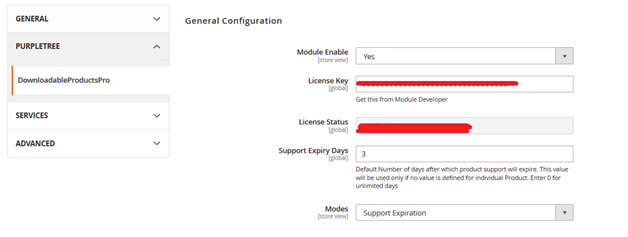
The extension provides two different modes for managing Magento downloadable products, allowing merchants to select the option that best matches their business model.
Support Expiration Mode
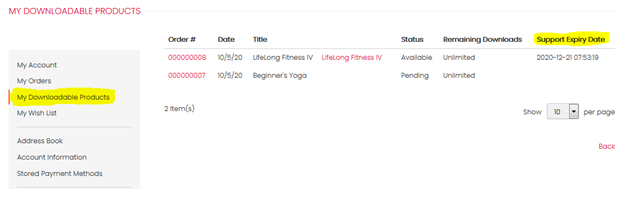
In this mode, customers can continue downloading product versions that were released before their support period expires. If a newer version is uploaded after the customer's support has expired, that version will not be available for download.
Benefits
- Controls access to future product updates.
- Allows customers to download eligible product versions.
- Suitable for stores offering software updates during a support period.
Product Expiration Mode
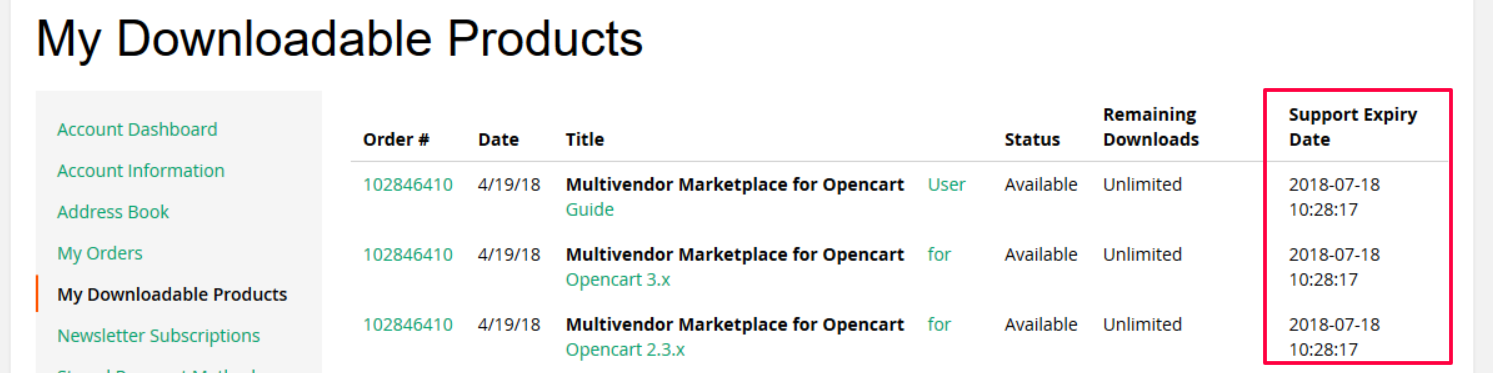
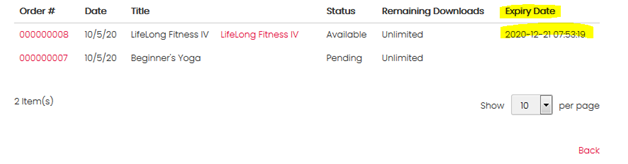
When Product Expiration mode is selected, downloadable product links remain available only until the configured expiration period ends. After the expiration date, the download links no longer appear in the customer's My Downloadable Products section.
Benefits
- Automatically manages download availability.
- Prevents access after the configured expiration period.
- Works well for time-limited downloadable products.
Configure Expiry Days
The extension allows administrators to define the number of days after purchase that downloadable products remain available. A default expiry period can be configured, which is applied whenever a product-specific value is not provided.
The expiration period is calculated from the invoice creation date, not from the order creation date.
Benefits
- Provides consistent download expiration management.
- Automatically calculates product availability.
- Reduces manual administration.
Product-Specific Expiry Days
A new Expiry Days field is available on downloadable product pages. Merchants can specify a custom expiration period for individual products. If this field is left empty, the extension automatically uses the default expiry period configured in the settings.
Benefits
- Allows different products to have different download periods.
- Overrides the default configuration whenever required.
- Provides greater flexibility for digital product management.
Automatic Download Link Updates
Whenever a downloadable product link is updated, the extension automatically updates the download links for previous customer orders that are still within the configured expiry period. Customers continue receiving the updated download until their expiration date is reached.
Benefits
- Keeps eligible customer downloads up to date.
- Reduces manual work when product files change.
- Simplifies downloadable product maintenance.
Manage Download Expiry from Orders
Administrators can view downloadable product expiry information directly from completed orders. The order displays the product name, SKU, and the current expiry date. If the download period has ended, the product is shown as Expired.
Benefits
- Provides quick access to expiry information.
- Improves order management.
- Makes customer support easier.
Extend Product Expiry Date
If additional download access is required, administrators can manually select a new expiry date using the date picker available in the order view. After updating the expiry date, the extension saves the new date and records the change in the order history.
Benefits
- Allows merchants to extend download access when needed.
- Keeps a record of expiry date changes.
- Provides greater flexibility when assisting customers.
Customer Download Dashboard
Customers can log in to their Magento account and open the My Downloadable Products section to view all downloadable products that are currently available. Products that are approaching expiration remain visible until their expiry date, while expired downloads are no longer displayed.
Benefits
- Provides a dedicated area for downloadable products.
- Allows customers to easily access available downloads.
- Clearly reflects download availability based on the configured expiration period.
Conclusion
Purpletree Downloadable Products Pro for Magento 2 gives merchants greater control over downloadable products by offering flexible expiration modes, configurable expiry periods, automatic download link updates, order-level expiry management, and a dedicated customer download dashboard. These features help organize digital product delivery while managing customer access according to the configured expiration settings.
```