


Purpletree Auction for OpenCart 4.x: Complete Auction Management Solution

Purpletree Auction for OpenCart 4.x: Complete Auction Management Solution
Purpletree Auction brings complete auction functionality to OpenCart 4.x, allowing store administrators to convert regular products into auction products and manage the auction process from start to finish. The extension provides tools for configuring auction pricing, bidding rules, reserve prices, Buy It Now options, auction schedules, customer bidding, winner selection, and notifications.
Customers can participate in active auctions through manual bidding or Proxy Bidding, monitor their bidding activity, view auction countdowns, and access completed auctions they have won. Automated processing through OpenCart cron helps manage scheduled activation, auction expiration, winner selection, and auction status updates.
Turn OpenCart Products into Auction Products
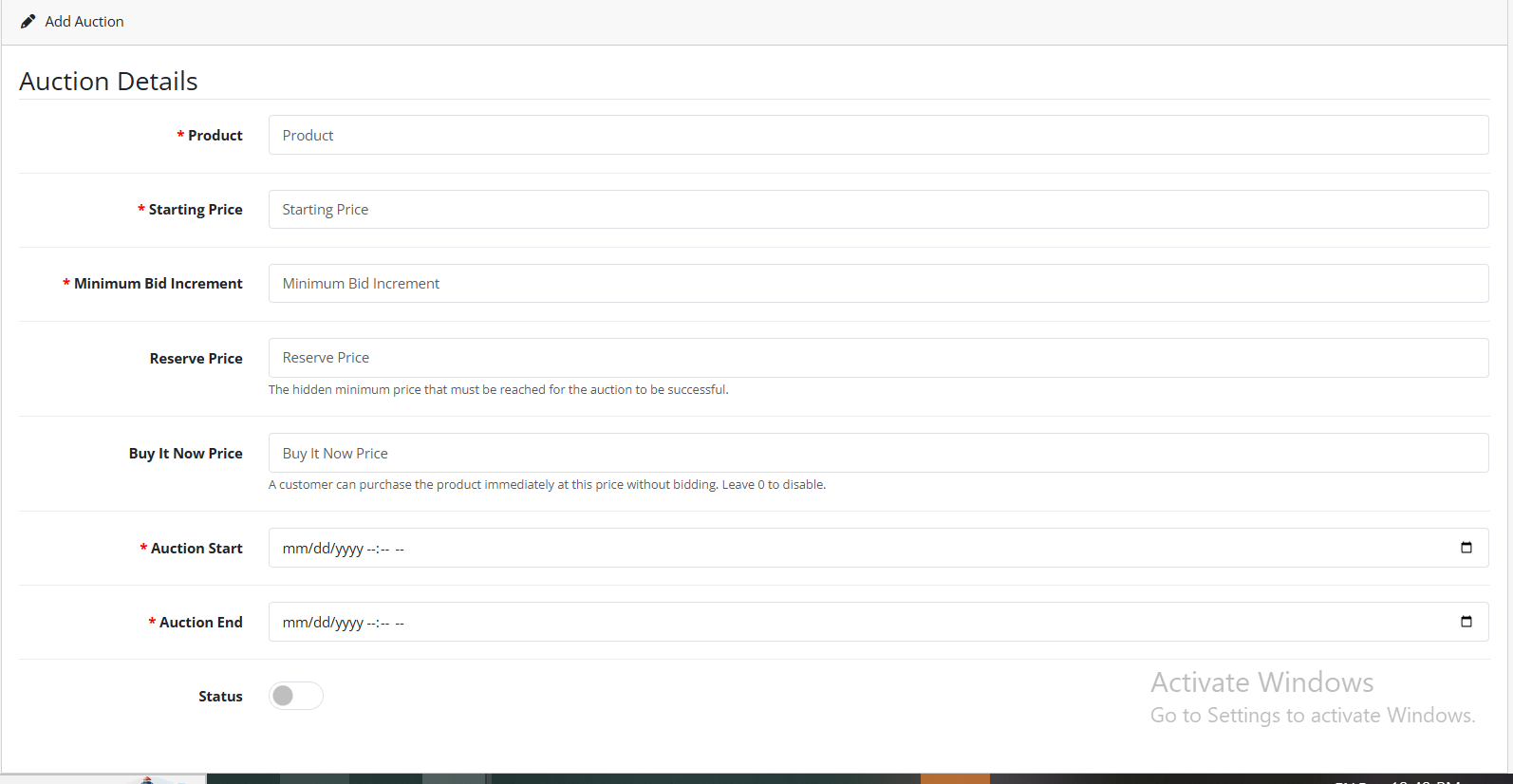
Purpletree Auction allows administrators to create and manage auction products directly from the OpenCart administration area. Auctions can be created through the Auction management section or through the Auction tab available in the OpenCart product form when the module and license are active.
Administrators can configure the auction product, starting price, bidding increments, reserve price, Buy It Now price, start time, end time, and auction status.
Flexible Auction Pricing and Bidding Rules
Starting Price
The Starting Price establishes the minimum amount required for the first valid bid. For example, when an auction has a starting price of 100.00, the first valid bid cannot be lower than 100.00.
Minimum Bid Increment
The Minimum Bid Increment determines how much a new bid must exceed the current bid. If the current bid is 100.00 and the minimum increment is 10.00, the next valid bid must be at least 110.00.
Tiered Bid Increments
Purpletree Auction supports different bid increments according to the current auction price. Administrators can configure multiple price ranges with their corresponding increments.
Buy now OpenCart Auction Module
| Current Price Range | Increment |
|---|---|
| 0 – 99.99 | 5.00 |
| 100 – 499.99 | 10.00 |
| 500 – 999.99 | 25.00 |
If no configured tier matches the current auction price, the default minimum increment is used.
Reserve Price for Auction Control
The Reserve Price defines the minimum value required for an auction to produce a winner. The reserve price can remain hidden from customers when configured as a hidden reserve.
For example, if the reserve price is 150.00 and the highest valid bid is 140.00, the reserve has not been met. When the highest valid bid reaches 150.00, the reserve is considered met.
A global reserve can also be configured for auctions where the individual auction reserve is set to zero.
Buy It Now for Immediate Purchase
Purpletree Auction also supports a Buy It Now option that allows a logged-in customer to purchase an active auction product immediately at a fixed price instead of continuing with the auction.
For example, when the Buy It Now price is 500.00, the customer can purchase the product immediately for 500.00. Setting the Buy It Now price to 0 disables Buy It Now for that auction.
Buy It Now Processing
When a successful Buy It Now transaction takes place, the auction is locked for processing, the customer becomes the winner, the final price is stored, and the product and selected options are added to the cart. The Buy It Now price is applied and the auction status changes to Ended.
Scheduled Auctions with Start and End Times
Administrators can schedule auctions by configuring their start and end times.
Auction Start Time
Before the configured start time, an auction remains Pending. Once the start time is reached, the auction becomes Active through the auction cron process.
Auction End Time
The configured End Time determines when an auction should finish. Once the end time has passed, the auction becomes Ended and the cron process performs winner selection based on valid bids and reserve conditions.

Live Auction Countdown
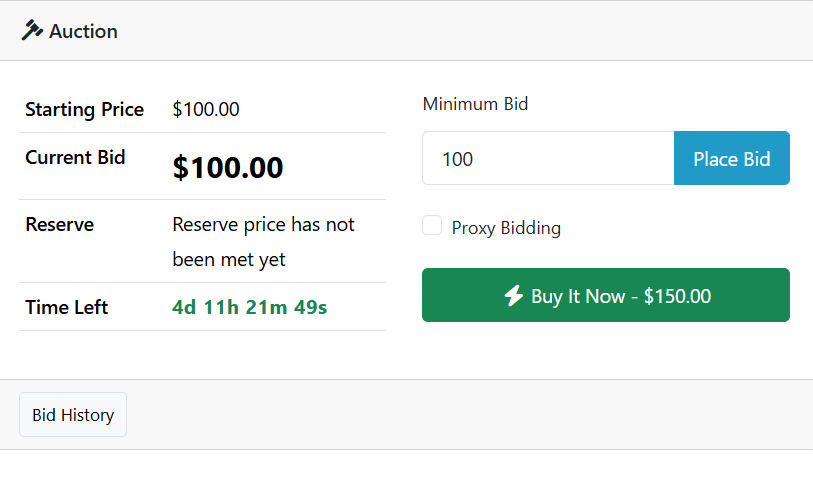
The auction storefront provides a live countdown displaying the remaining auction time in Days, Hours, Minutes, and Seconds.
The countdown updates approximately every one second. On normal home-page product cards, auction information can appear on hover, while the dedicated auction collection displays auction information directly.
Live Bid Updates
Customers can receive refreshed auction information while the auction product page remains open. The extension refreshes important auction information approximately every five seconds.
- Current bid
- Minimum next bid
- Reserve status
- Bid history
The implementation uses polling and does not require WebSocket connections.
Manual Bidding for Customers
Customers must be logged in before placing a bid. The bid must satisfy the applicable minimum requirement.
For the first bid, the required amount is based on the Starting Price. For subsequent bids, the bid must meet the Current Bid plus the applicable increment.
The bid-processing system uses database transactions to help prevent conflicting concurrent bid updates.
Proxy and Automatic Bidding
Proxy Bidding allows customers to specify a private maximum bid. The system can automatically increase the customer's bid according to the configured increment without exceeding the customer's private maximum.
How Proxy Bidding Works
For example, Customer A can have a current bid of 100.00 with a private maximum bid of 200.00. If Customer B later places a bid of 120.00, the system can automatically increase Customer A's bid according to the configured increment without exceeding the 200.00 maximum.
If another customer exceeds Customer A's maximum bid, Customer A becomes Outbid.
Proxy Bidding Controls
Administrators can control whether automatic bidding is enabled, whether automatic increments use the normal increment, and whether customers can modify their proxy maximum multiple times.
Bid History and Customer Auction Activity
Bid History
Customers can expand Bid History on an auction product page. Depending on administrator visibility settings, bid history can display the bid amount, bidder name, bid type, and date and time.
The administrator controls bid-price and bidder-name visibility from Auction > Settings.
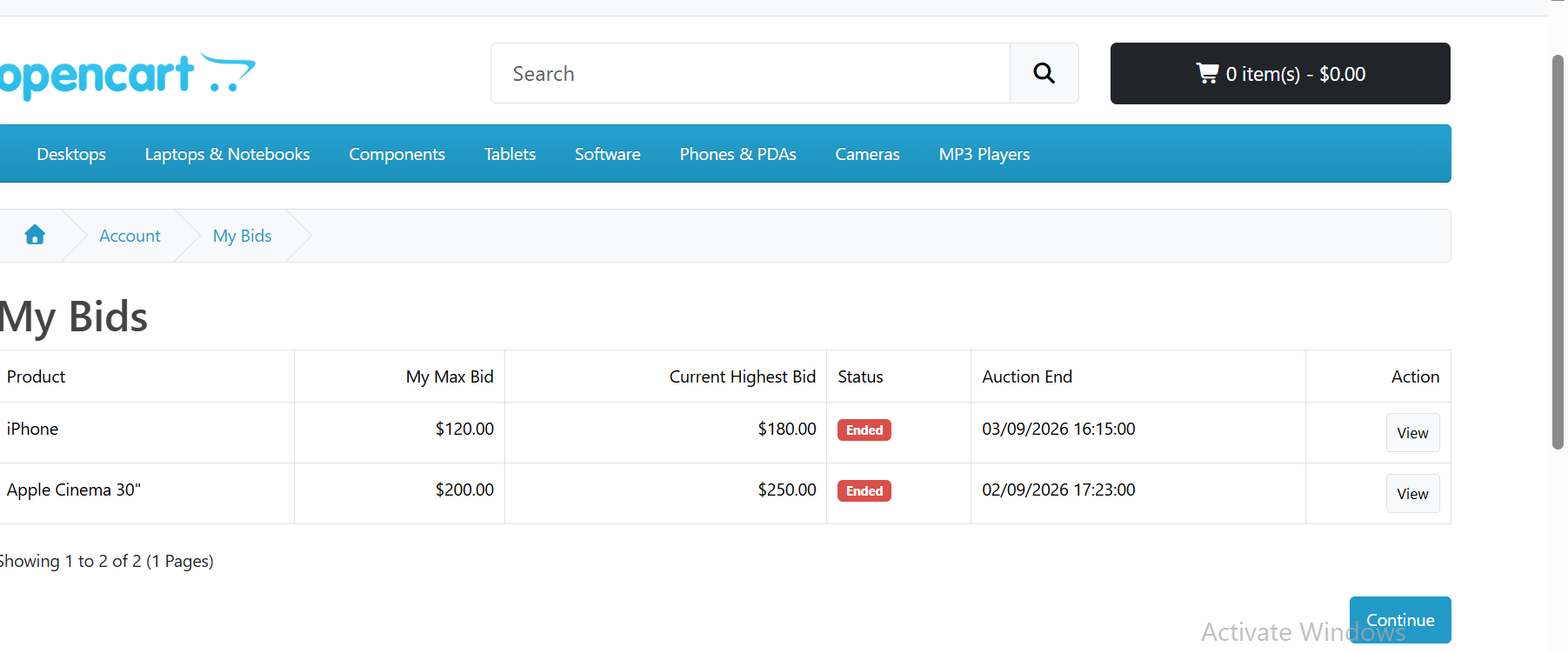
My Bids
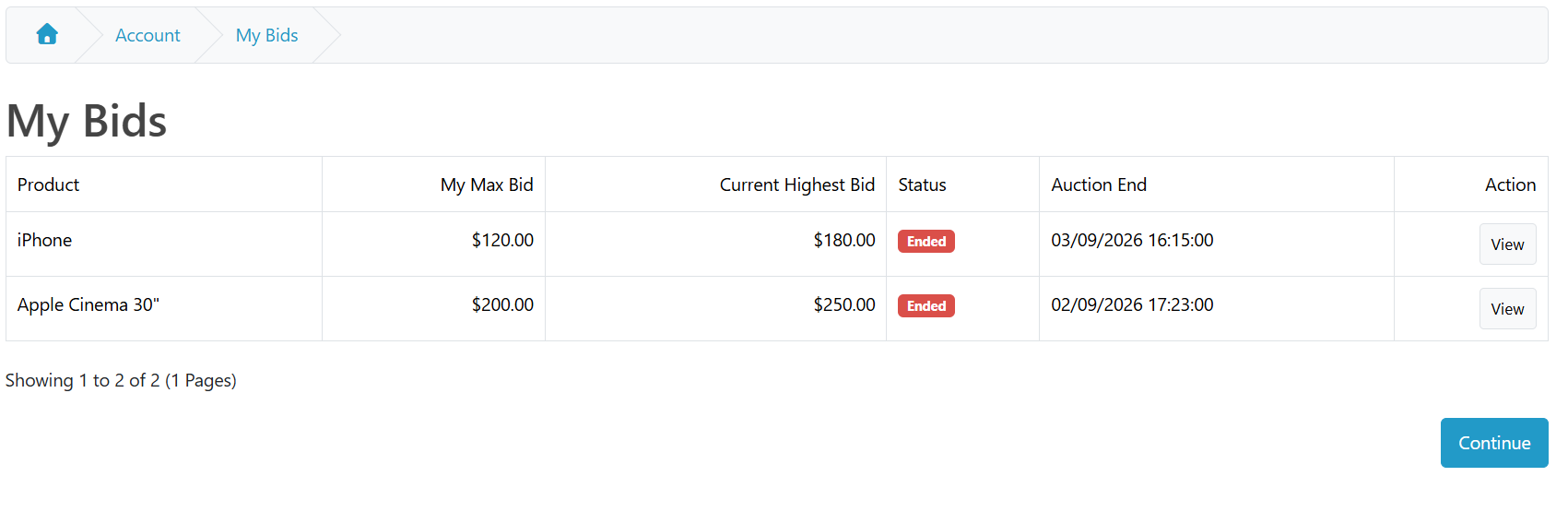
Logged-in customers can access My Account > My Bids to view auctions in which they have participated.
The available information can include the auction or product, customer's maximum bid, current highest bid, bid status, winning status, and outbid status.
Won Auctions
Customers can access My Account > Won Auctions to view completed auctions they have won.
The page provides information including the auction or product, winning status, final price, and completed auction information.
Automatic Auction Winner Selection
When an auction expires, Purpletree Auction uses the cron process to automatically process winner selection.
Highest Valid Bid
The system identifies the highest valid bid associated with the expired auction.
Reserve Price Check
The effective reserve price is checked before the winner is selected.
Winner and Final Price
If the reserve price has been met, the winner is stored and the final price is recorded.
Auction Completion
The auction status changes to Ended after processing.
Auction Without a Winner
If no valid bids exist or the reserve price is not met, the auction ends without a winner.
Cron-Based Auction Processing
Purpletree Auction registers its background task with a one-minute cycle. The server must execute OpenCart's main cron.php regularly for background auction processing.
Cron processing is required for scheduled auction activation, auction expiration, winner selection, final price processing, auction status updates, and background notifications where applicable.
Without cron, an auction page may show that its time has expired while background processing such as winner selection or scheduled activation is delayed.
Customer and Admin Email Notifications
Purpletree Auction supports notifications for important auction events.
- Winner email to customer
- Winner email to admin
- Manual outbid email
- Automatic or Proxy outbid email
- Custom automatic outbid message
Email delivery depends on the OpenCart mail configuration. OpenCart mail settings and SMTP should be configured and verified before testing auction notifications.
Admin Auction and Bid Monitoring
Auction Management
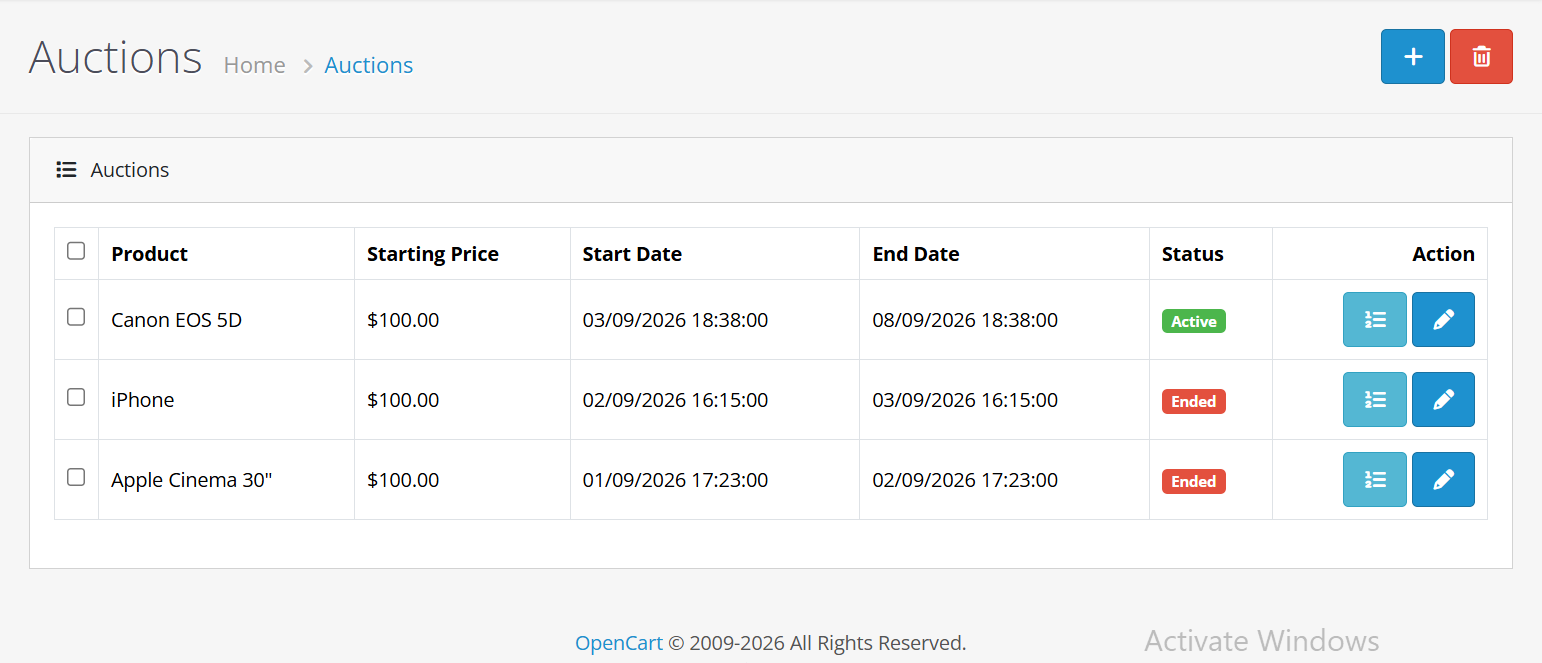
Administrators can manage auctions from Auction > Auctions. The available functions include adding, editing, viewing, deleting, and monitoring auctions.
The auction list displays information such as the product, starting price, start date, end date, and auction status.
Bid Monitoring
Administrators can use the Bids button for an auction to monitor customer bidding activity.
The Bids screen can display the customer, customer email, bid amount, proxy maximum, manual or Proxy bid type, and bid date and time.
The Bids screen is intended for monitoring and does not provide bid amount editing.
Centralized Auction Settings
The Auction > Settings section provides centralized controls for the extension.
License Settings
- License status
- License key
Buy It Now Settings
- Buy It Now availability
- Add to Cart behavior
Auction Display Settings
- Current bid visibility
- Bidder-name visibility
- Product status
- Regular-price display
- Bid-history visibility
Bidding Settings
- Fixed increments
- Tiered increments
- Automatic bidding
- Proxy bidding behavior
Reserve Settings
- Reserve status
- Reserve behavior
Notification Settings
- Customer winner notification
- Admin winner notification
- Manual outbid notification
- Automatic or Proxy outbid notification
- Automatic outbid message
OpenCart 4.x and PHP Requirements
Purpletree Auction is designed for OpenCart 4.x and requires PHP 8.1 or newer.
The required environment includes OpenCart 4.x, PHP 8.1 or newer, MySQL or MariaDB, PHP cURL for license validation, cron for scheduled activation and winner selection, and mail transport for email notifications.
Conclusion
Purpletree Auction provides a complete auction workflow for OpenCart 4.x, covering auction creation, starting prices, minimum and tiered bid increments, reserve-price handling, Buy It Now, scheduled auctions, live countdowns, manual bidding, Proxy Bidding, bid history, My Bids, Won Auctions, automatic winner selection, admin monitoring, email notifications, and cron-based auction processing.
With its combination of auction configuration, customer bidding functionality, automated winner selection, and background cron processing, Purpletree Auction provides the core functionality required to manage auctions within an OpenCart 4.x store.