Advanced OpenCart Custom Product Designer Front-End Features for eCommerce Stores
OpenCart Custom Product Designer: A Practical Front-End Interface for Modern eCommerce
In today’s competitive eCommerce environment, offering product customization has become a key differentiator for online businesses. The OpenCart Custom Product Designer provides a structured and user-friendly front-end interface that enables customers to personalize products visually before making a purchase.
Based strictly on the available interface, this tool focuses on simplicity, usability, and a seamless path from design to checkout.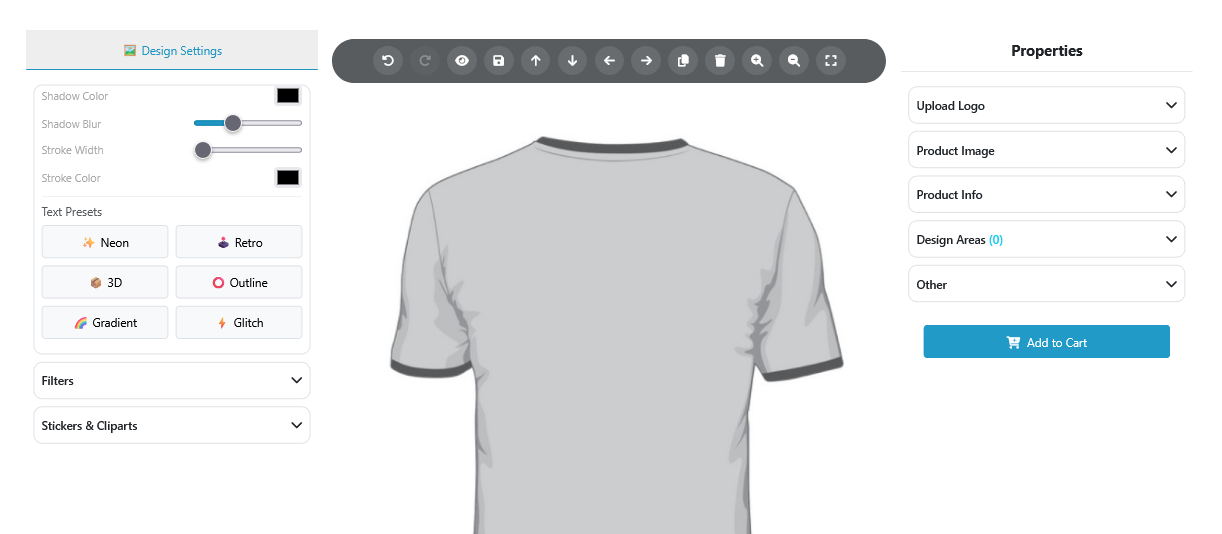
Structured and User-Centric Interface
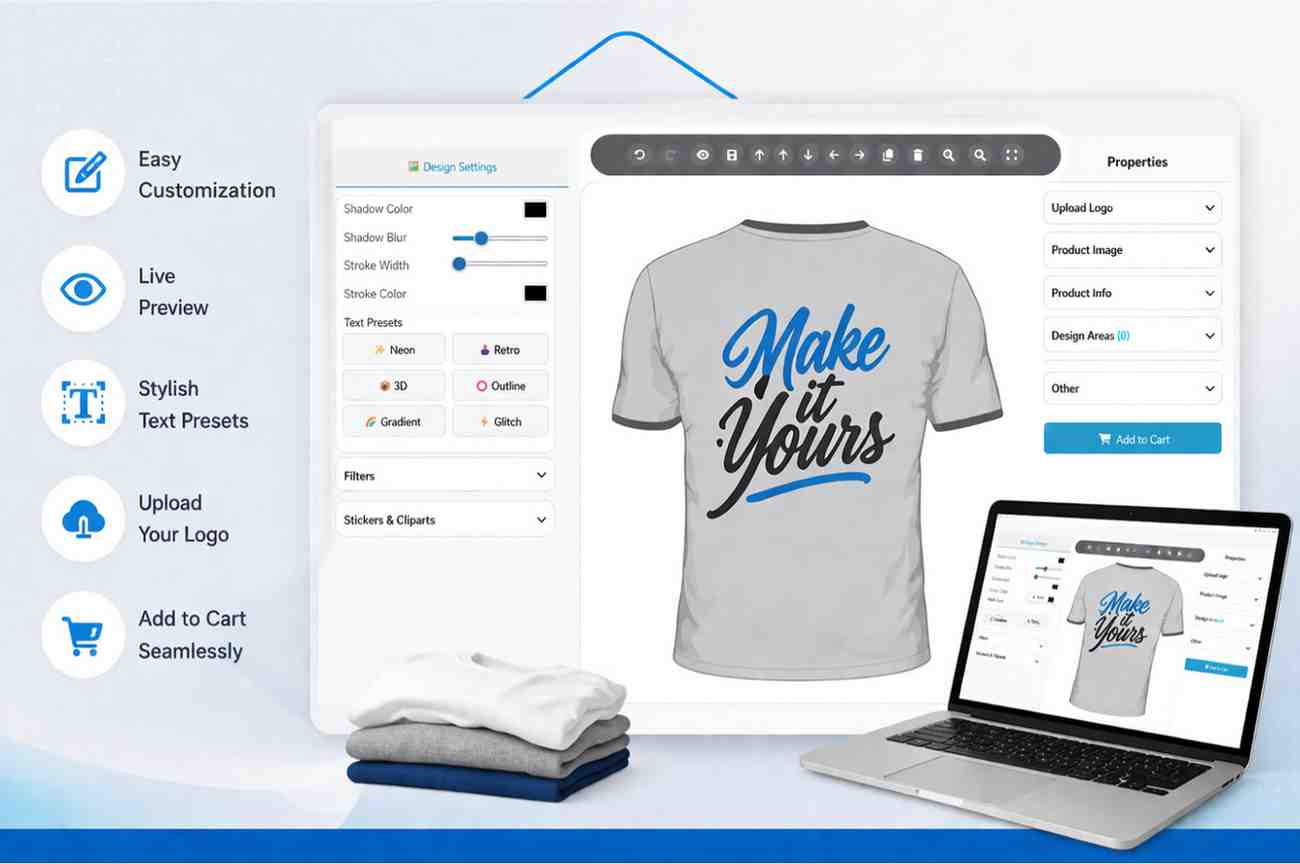
The designer interface is divided into three main sections:
- Design controls on the left panel
- Product visualization in the center
- Configuration and purchase options on the right panel
This structured layout ensures a smooth user experience, allowing customers to design and finalize products without unnecessary complexity.
Design Settings for Visual Customization
The left panel includes essential styling controls that help users adjust the appearance of their design elements.
Core Styling Options
- Shadow color selection
- Shadow blur adjustment using a slider
- Stroke width control
- Stroke color selection
These options allow users to refine the visual clarity and presentation of their customized content.
Predefined Text Presets
The interface provides ready-to-use text styles that simplify the design process:
- Neon
- Retro
- 3D
- Outline
- Gradient
- Glitch
These presets enable users to apply stylized effects instantly without manual adjustments.
Additional Customization Sections
Two expandable sections are available within the design panel:
- Filters
- Stickers & Cliparts
While their internal options are not visible, these sections indicate support for extended customization capabilities.
Central Product Visualization
The center of the interface displays the product preview, such as a T-shirt, which serves as the design canvas. This area allows users to visually assess their customization before proceeding.
A clear product preview helps reduce uncertainty and improves the overall buying experience.
Editing Toolbar for Basic Controls
A toolbar positioned above the product includes multiple action icons.
Visible Controls
- Undo and redo actions
- Zoom controls
- Delete option
These controls support basic design adjustments, ensuring usability for a wide range of users.
Product Configuration Panel
The right-side panel provides product-related configuration options through collapsible sections.
Available Sections
- Upload Logo
- Product Image
- Product Info
- Design Areas (0)
- Other
This panel allows users to manage inputs and review product details before completing the customization process.
Integrated Add to Cart Functionality
A clearly visible Add to Cart button is available within the same interface, enabling users to proceed directly to purchase after completing their design.
This streamlined process reduces friction and improves conversion efficiency.
Conclusion
The OpenCart Custom Product Designer interface demonstrates a practical and structured approach to front-end product customization. With clearly defined sections, essential styling tools, and an integrated purchase flow, it supports businesses in delivering a smooth and efficient customization experience.
This makes it a valuable solution for eCommerce stores aiming to offer personalized products while maintaining ease of use for their customers.