Managing data for bulk product import in opencart

Best feature: Both, Admin as well as the seller can import and export the product data.
Read below how admin and seller can do upload.
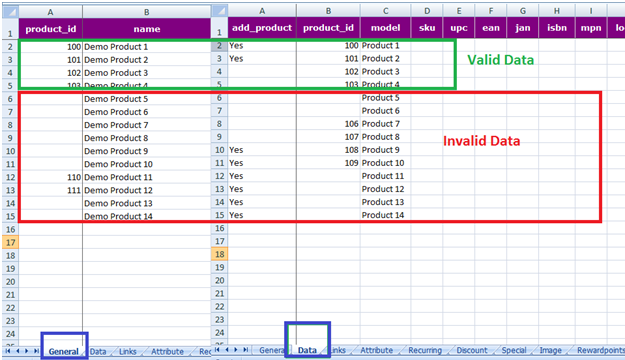
Valid Data
- · To Add New Product –
o product_id will not be real product id. It will be used as serial number to link with other tabs
o Use any valid number as product_id in here.
o General and Data tabs must have same product_id anywhere in the sheet.
o Row 2 and Row 3 shows product to be added in opencart and their real product id will be generated after importing Sheet. 100 and 101 are just acting as a serial number in here.
- · To Update Product -
o product_id must be real in this case.
o If Product Id 102 and 103 product avalibale in opencart only then that product data will be updated.
o Rows with product_id 102 and 103 must be present in General as well as Data Tab.
o Row 4 and Row 5 shows product data to be updated for product_id 102 and 103.
Invalid Data
- Row 6 and Row 7 – Leaving product_id blank in General and Data Tabs.
- Row 8 and Row 9 – Leaving product_id blank in General Tab but filling in Data Tab.
- Row 10 and Row 11 – Leaving product_id blank in General tab but filling in Data tab.
- Row 12 and Row 13 – Filling product_id in General tab but leaving blank in Data Tab.
- Row 14 and Row 15 – Leaving product_id blank in General and Data tab.
More details of Purpletree Opencart Multivendor marketplace can be found here.