


Purpletree AVIF Image Extension Complete User Guide for Magento
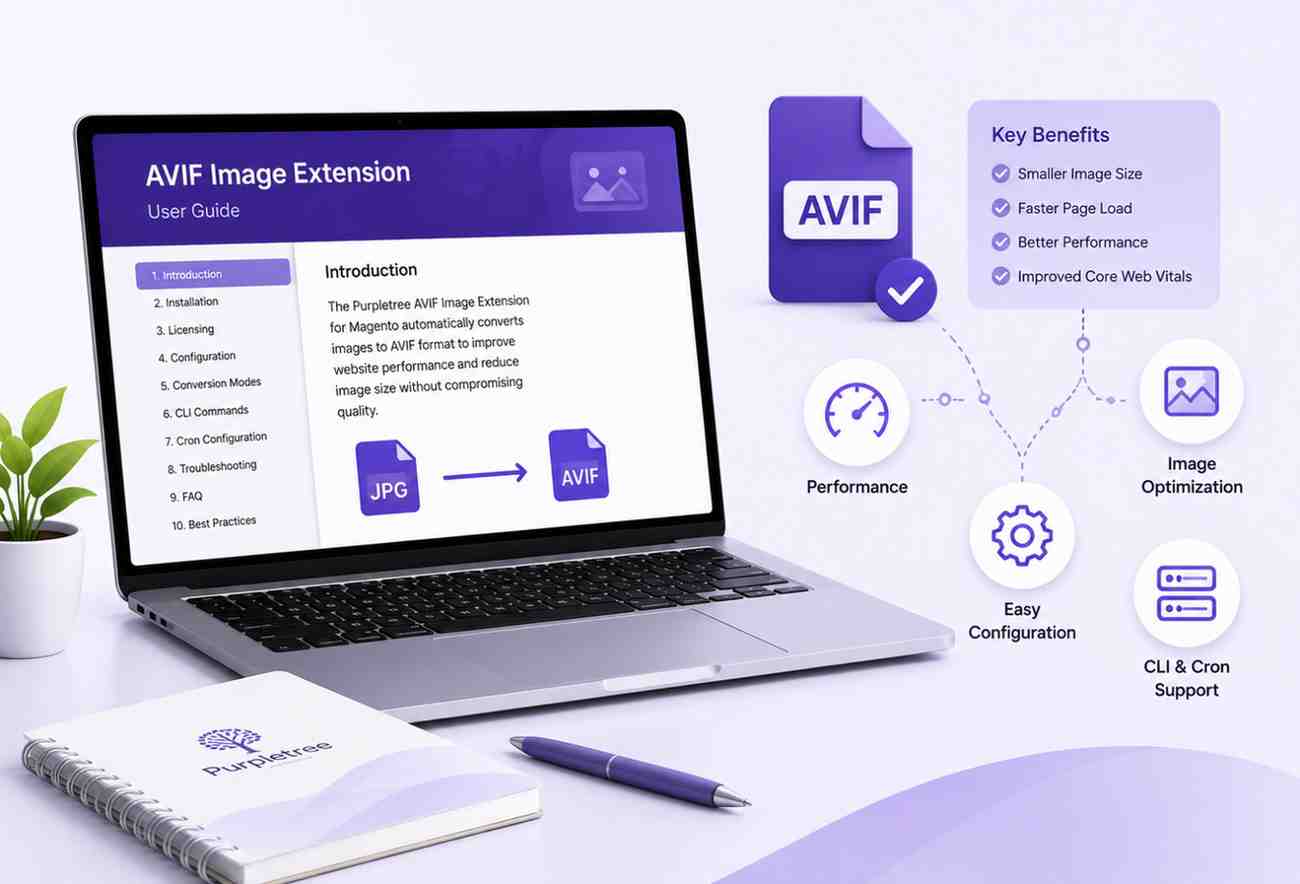
Purpletree AVIF Image Extension Complete User Guide
The Purpletree AVIF Image Extension helps Magento store owners automatically convert JPG, PNG, and GIF images into the modern AVIF image format. This guide explains installation, configuration, image conversion, optimization, troubleshooting, and best practices to help you get the best performance from your online store.
1. Introduction
About the Extension
Learn what the AVIF Image Extension is, how it works, and how it improves website performance by serving lightweight AVIF images while maintaining excellent visual quality.
Key Features
- Automatic AVIF image conversion
- CLI image generation
- Cron-based background processing
- Multiple encoding methods
- Queue management
- Metadata preservation
- Browser compatibility detection
- REST API and GraphQL support
Benefits
Discover how AVIF images improve page speed, reduce bandwidth usage, enhance Core Web Vitals, and provide a better customer experience.
What's New
Explore the latest improvements, newly added features, performance enhancements, and compatibility updates included in the current release.
Package Contents
Review everything included in the extension package, including module files, documentation, licensing information, and installation resources.
2. System Requirements
Supported Magento Versions
View all compatible Magento Open Source and Adobe Commerce versions supported by the extension.
Supported PHP Versions
Check the supported PHP versions required for stable operation.
Composer Requirements
Review Composer dependencies needed for installation.
Required PHP Extensions
Learn which PHP extensions must be installed before enabling the module.
Optional PHP Extensions
See optional extensions that improve performance and compatibility.
Web Server Requirements
Supported Apache, Nginx, and other server environments.
Database Requirements
Database compatibility and storage recommendations.
Browser Compatibility
Supported browsers and fallback behavior for browsers without AVIF support.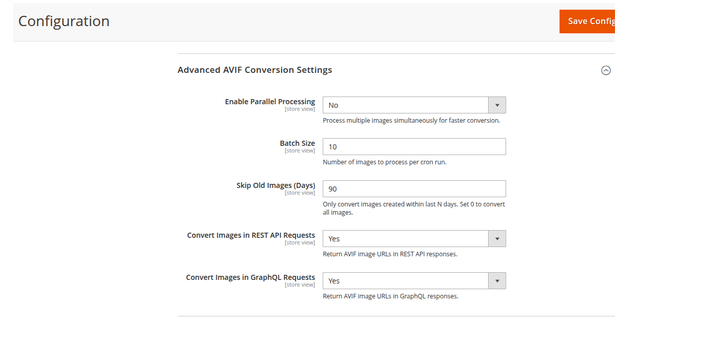
3. Installation
3.1 Package Installation
Manual Installation
Step-by-step instructions for installing the extension manually.
Composer Installation
Install the extension using Composer when available.
3.2 Deploy Module
php bin/magento module:enable Purpletree_AvifImage
php bin/magento setup:upgrade
php bin/magento setup:di:compile
php bin/magento cache:flush
3.3 Verify Installation
php bin/magento module:status
3.4 Verify CLI Commands
php bin/magento list
4. Licensing
Enter License Key
Instructions for activating the extension license.
License Validation
How online license verification works.
Localhost Behaviour
Understand how licensing works in local development environments.
Development Environment
License usage recommendations for testing servers.
Production Environment
Production licensing guidelines.
License Status
How to verify active, expired, or invalid licenses.
License Errors
Common license validation problems and solutions.
5. Admin Configuration
Configuration Options
Every configuration section includes:
- Description
- Default Value
- Available Options
- Recommended Setting
- Example
- Screenshot
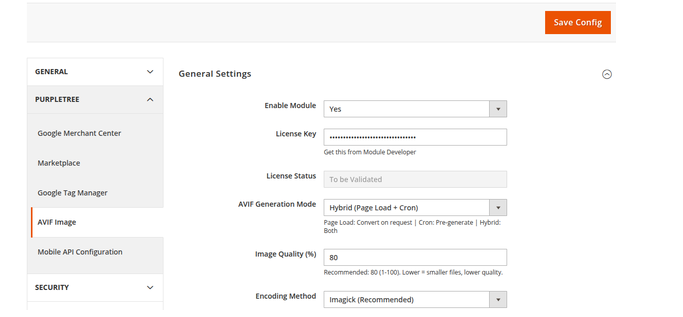
Enable Module
Description: Enables or disables the AVIF Image Extension.
Default Value: No
Recommended: Yes
Screenshot: Admin configuration example.
6. Conversion Modes
Page Load Mode
Understand how images are converted during frontend requests.
Advantages
Limitations
Recommended Use
Cron Mode
Queue Processing
Background Conversion
Performance Benefits
Hybrid Mode
Mixed Processing
Best Practices
Conversion Mode Comparison
Compare all conversion methods and choose the most suitable option.
7. Encoding Methods
Imagick
GD Library
CLI Encoding (avifenc / ffmpeg)
Encoding Comparison Table
Performance Comparison
Quality Comparison
Recommended Settings
8. Image Quality Settings
Quality Levels
60 Quality
70 Quality
80 Quality
90 Quality
100 Quality
Each quality level includes:
- Image Size
- Compression Ratio
- Visual Quality
- Recommended Usage
9. Metadata Preservation
No Metadata
EXIF Metadata
ICC Color Profile
XMP Metadata
Preserve All Metadata
10. Supported Image Types
Product Images
Category Images
CMS Images
CMS Blocks
Page Builder Images
Slider Images
CSS Background Images
REST API Images
GraphQL Images
External Images
11. CLI Commands
Generate Images
Syntax
Example
Output
Explanation
Regenerate Images
Syntax
Parameters
Examples
Status Command
Syntax
Example Output
Explanation
12. Cron Configuration
Magento Cron
Linux Cron
cPanel Cron
Plesk Scheduler
Cloudways
DigitalOcean
AWS EC2
Configuration Examples
13. Admin Dashboard
Dashboard Widgets
Total Images
Converted Images
Pending Queue
Failed Queue
Space Saved
Conversion Rate
Dashboard Buttons
- Generate
- Regenerate
- Clean Cache
- Refresh
14. Queue Processing
Queue Creation
Queue Status
Retry Logic
Failed Jobs
Cleanup
Database Tables
15. Browser Detection
Accept Header Detection
Picture Tag Support
Fallback Logic
Supported Browsers
Unsupported Browsers
16. REST API Support
Configuration
Sample Request
Sample Response
Image URL Replacement
17. GraphQL Support
Schema
Sample Query
Sample Response
18. Theme Compatibility
Luma Theme
Blank Theme
Hyvä Theme
Breeze Theme
Custom Themes
Compatibility Notes
19. Performance Recommendations
Stores with 100 Images
Stores with 1,000 Images
Stores with 10,000 Images
Stores with 100,000 Images
Recommended Server Settings
20. Troubleshooting
Common Issues
- Module not enabled
- Images not converting
- Cron not running
- CLI command errors
- Permission issues
- Memory limit exceeded
- Missing Imagick
- Invalid license
- Queue failures
Step-by-Step Solutions
21. Frequently Asked Questions
General Questions
This section answers 25–30 commonly asked questions covering installation, compatibility, browser support, image conversion, CDN usage, cache management, regeneration, Hyvä support, Page Builder compatibility, backups, production usage, and advanced configuration.
22. Best Practices
Recommended Image Quality
Recommended Conversion Mode
Cron Recommendations
Server Optimization
Backup Recommendations
23. Uninstallation
Disable Module
Remove Module
Delete AVIF Images
Database Cleanup
24. Version History
Version 1.1.1
- Added Hyvä Theme support
- Added Breeze Theme support
- Improved queue processing
- Added additional CLI options
- Fixed duplicate image conversion
- Improved overall performance
25. Support
Company Information
- Company Name
- Official Website
- Email Support
- Documentation
- Release Notes
- Copyright
- License Information
Adobe Commerce Marketplace Documentation Package
Included Documents
- User Guide (PDF)
- Installation Guide (PDF)
- Developer Guide (PDF)
- README.md
- CHANGELOG.md
- LICENSE.txt
- Release Notes
- Marketplace Product Description
- High-Resolution Screenshots
- Extension Icon (SVG/PNG)
Conclusion
This user guide provides everything needed to install, configure, optimize, and maintain the Purpletree AVIF Image Extension for Magento. By following the recommended settings and best practices, store owners can significantly improve website speed, reduce image sizes, enhance SEO performance, and deliver a faster shopping experience across all supported browsers and devices.