Checkout Buttons for POS by Agent for Customers

In Purpletree POS for OpenCart, agents can handle customer checkouts efficiently. This guide explains how to use multiple payment buttons: Cash, Credit/Debit Card, Credit Buy, and Bank Transfer for quick payment processing at the POS system.
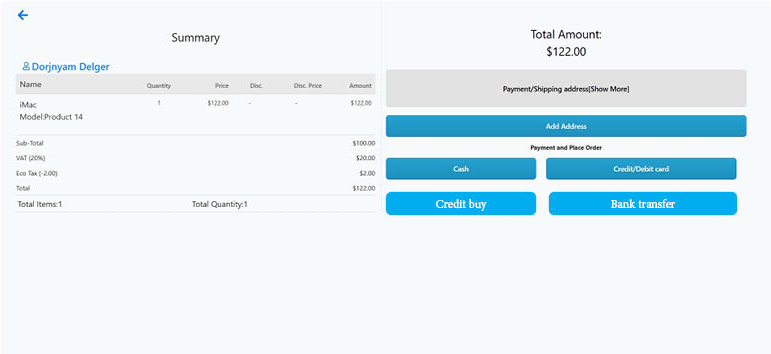
Explanation of Checkout Buttons
1. Cash
-
This option allows customers to pay using physical currency.
-
The Opencart POS agent collects the cash amount.
-
A pop-up appears asking for confirmation to accept payment via cash.
-
Once confirmed, the order is placed, and a receipt can be generated from the orders.
2. Credit/Debit Card
-
Customers can pay using their credit or debit cards.
-
The POS agent can process the payment of debit card/credit card(It has to be done manually)
-
A pop-up appears asking for confirmation to accept payment via card.
-
Once confirmed, the order is placed, and a receipt can be generated from the orders.
3. Credit Buy
-
This option is used when the customer wants to purchase credit.
-
The POS system can process the request.
-
A pop-up appears asking for confirmation to accept payment via credit buy.
-
Once confirmed, the order is placed, and a receipt can be generated from the orders.
4. Bank Transfer
-
Customers can choose to pay via direct bank transfer.
-
A pop-up appears asking for confirmation to accept payment via bank transfer.
-
Once confirmed, the order is placed, and a receipt can be generated from the orders.
Steps to Use the Checkout Buttons at POS
-
The POS agent logs in to the POS system.
-
Adds products to the cart for a customer.
-
Clicks on the Checkout button.
-
Selects the preferred payment method:
-
Cash: Collects cash, confirms payment, and places the order.
-
Credit/Debit Card: Processes the card payment, confirms payment, and places the order.
-
Credit Buy: Records the payment, confirms payment, and places the order.
-
Bank Transfer: Confirms bank transfer payment and places the order.
-
-
A receipt is generated for the customer.
Benefits of Multiple Payment Options
-
Faster checkout process.
-
Enhanced flexibility for customers.
-
Improved efficiency for POS agents.
-
Supports various customer payment preferences.
Conclusion
By understanding and using the different payment options in the Purpletree POS system, agents can provide a seamless checkout experience for customers. These options allow for better transaction management and convenience for both customers and store owners.
Note: Payments made via bank transfer, credit card, or debit card must be processed manually before the order can be completed. Agent has to do it manually.