Opencart Extensions

Hide Checkout Steps / Fast Checkout

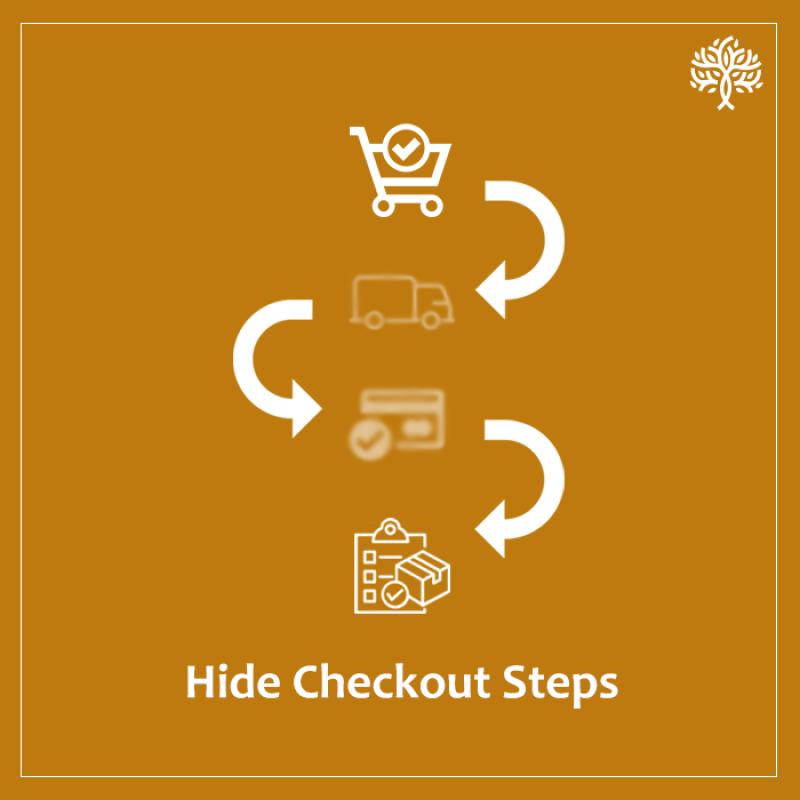
The Purpletree Hide Checkout Steps / Fast Checkout extension simplifies the default OpenCart checkout by removing unnecessary steps like shipping, billing and payment selection. Store owners can set default values for shipping, payment and terms, allowing customers to complete their order in just 2–3 steps. This results in a much faster, smoother checkout experience and lower cart abandonment, with compatibility across all OpenCart themes. SUPPORTS OPENCART VERSIONS: 2.3.X AND 3.X
$29 One-time payment
SKU : hide-checkout-steps-opencart
Share :
(14)
Trusted by 5000+ Stores
Lifetime Updates
6 Months Support

Description

Purpletree Hide Checkout Step Extension – Simple Summary

✔️ Hide Unnecessary Checkout Steps

  • Minimize the number of steps required for customers to place an order.
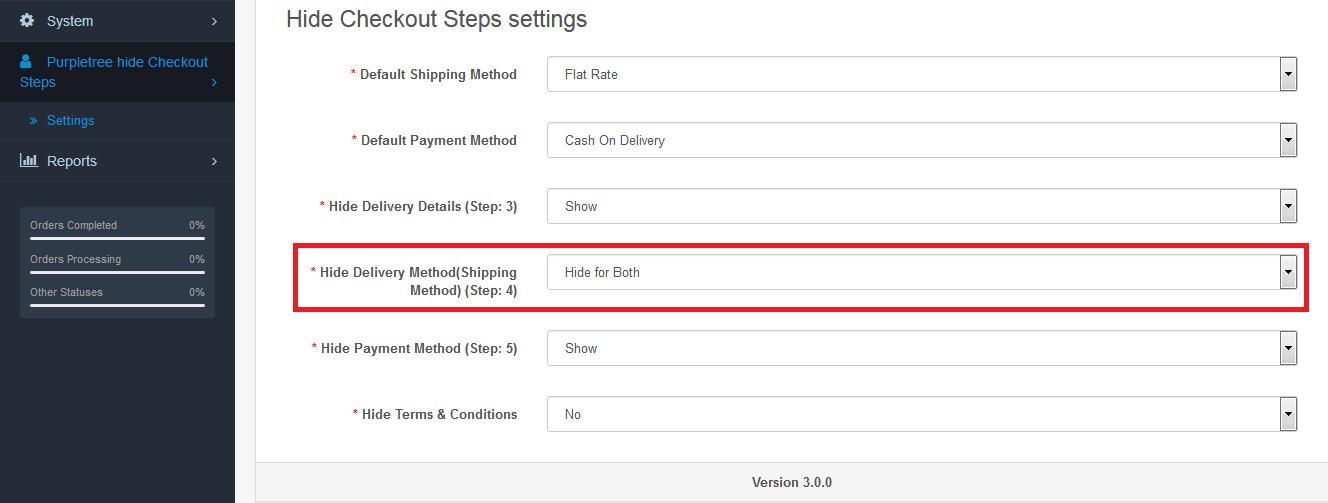
  • Example: Instead of prompting customers to manually choose a shipping method, you can configure Flat Rate Shipping as the default option, eliminating that step entirely.

✔️ Pre-Set Default Values for Checkout Fields

Automatically populate common checkout fields, reducing manual input.

Example:

  • Configure "Flat Rate Shipping" as the default shipping method for faster processing.
  • Designate "Cash on Delivery" as the default payment method to streamline payments.
  • Hide the "Terms & Conditions" checkbox to optimize the process.

✔️ Accelerated Checkout Experience

  • By skipping unnecessary steps, customers can complete their orders in fewer clicks, minimizing cart abandonment.
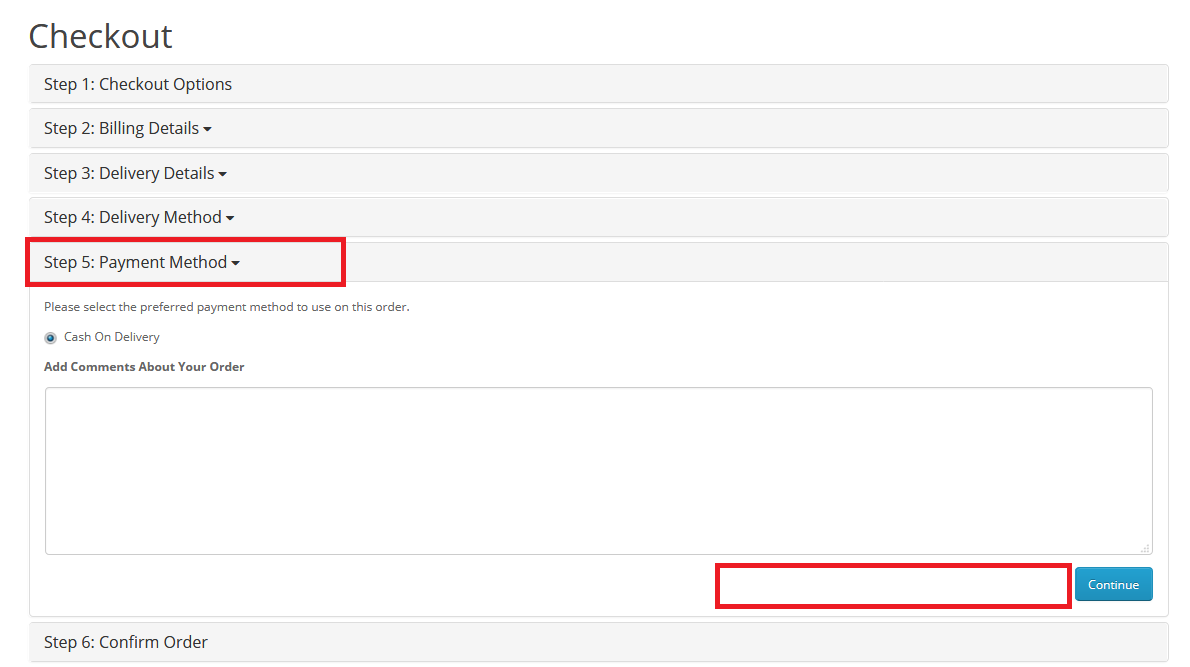
  • Example: A typical 6-step checkout process is condensed into just 2–3 steps, significantly speeding up the purchase journey.

✔️ Seamless Compatibility with All OpenCart Themes

  • Fully supports OpenCart’s default themes as well as popular themes like Journal 2 and Journal 3.
  • Example: Whether your store runs on a basic OpenCart theme or a custom Journal 3 setup, the extension integrates smoothly without compatibility issues.

A customer visits your OpenCart store and adds items to their cart. During checkout, instead of navigating through multiple steps, they are presented with a streamlined process:

  1. Shipping Method: "Flat Rate Shipping" is already configured as the default option, so the customer doesn’t need to select it manually.
  2. Payment Method: "Cash on Delivery" is pre-designated as the default payment method, saving additional clicks.
  3. Terms & Conditions: The checkbox is hidden, eliminating unnecessary steps.

As a result, what would typically be a 6-step checkout is now reduced to just 2–3 steps, allowing the customer to complete their purchase quickly and effortlessly. This simplified flow not only enhances user experience but also reduces cart abandonment rates, leading to higher conversion rates for your store.
Hide Checkout Steps / Fast Checkout 1
Hide Checkout Steps / Fast Checkout 2


Our Support, Guide & Policies

Download the user guide.

In case of any issues, please open a ticket from our helpdesk.

Note: Our extensions have a licensing policy, click here to view the license policy.

Features

Purpletree Hide Checkout Step Extension

The Purpletree Hide Checkout Step Extension helps you simplify and accelerate the checkout process in your OpenCart store by removing unnecessary steps and pre-configuring default values.

Hide Unnecessary Checkout Steps

Minimize the number of steps required for customers to place an order.

Example: Instead of prompting customers to manually choose a shipping method, you can configure Flat Rate Shipping as the default option, eliminating that step entirely.

Pre-Set Default Values for Checkout Fields

Automatically populate common checkout fields, reducing manual input.

Example:

Configure "Flat Rate Shipping" as the default shipping method for faster processing.

Designate "Cash on Delivery" as the default payment method to streamline payments.

Hide the "Terms & Conditions" checkbox to optimize the process.

Accelerated Checkout Experience

By skipping unnecessary steps, customers can complete their orders in fewer clicks, minimizing cart abandonment.

Example: A typical 6-step checkout process is condensed into just 2–3 steps, significantly speeding up the purchase journey.

Seamless Compatibility with All OpenCart Themes

Fully supports OpenCart’s default themes as well as popular themes like Journal 2 and Journal 3.

Example: Whether your store runs on a basic OpenCart theme or a custom Journal 3 setup, the extension integrates smoothly without compatibility issues.

Benefits

Value for Everyone

For Store Owners

  • Reduce cart abandonment rates
  • Increase conversion rates
  • Simplify checkout configuration without core modifications
  • Improve overall store performance
  • Save customer support time related to checkout confusion

For Customers

  • Faster checkout process
  • Fewer clicks to complete orders
  • Clear and simple checkout flow
  • Less confusion during payment and shipping selection
  • Better overall shopping experience

A simplified checkout improves customer confidence and helps drive faster purchase decisions.

Live Demo

See It In Action

Demo Admin

Username: admin

Password: demo123

Visit Demo
Customer Dashboard

Username: customer@purpletreesoftware.com

Password: demo123

Visit Demo
Compatibility

Works With Your OpenCart Version

Supported OpenCart Versions

Fully tested and structured to work smoothly across all versions.

2.3.0.0 2.3.0.1 2.3.0.2 3.0.0.0 3.0.1.1 3.0.1.2 3.0.2.0 3.0.3.0 3.0.3.1 3.0.3.2 3.0.3.3 3.0.3.5 3.0.3.6 3.0.3.7 3.0.3.8 3.0.3.9 3.0.4.0 3.0.4.1 3.0.5.0
FAQ

Frequently Asked Questions

No, it works without affecting core functionality.

Yes, it fully supports OpenCart default themes and popular themes like Journal 2 and Journal 3.

Yes, you can configure default shipping and payment methods to reduce checkout steps.

Yes, the extension allows you to hide unnecessary checkout fields including the Terms & Conditions checkbox.

By reducing a 6-step checkout process to 2–3 steps, customers complete purchases faster with fewer interruptions.
Customer Reviews

What Our Customers Say

My Cart Cart Page

We may use cookies or any other tracking technologies when you visit our website, including any other media form, mobile website, or mobile application related or connected to help customize the Site and improve your experience. Read Full Cookies