OpenCart Contribution – Fixing auto invoice not generated
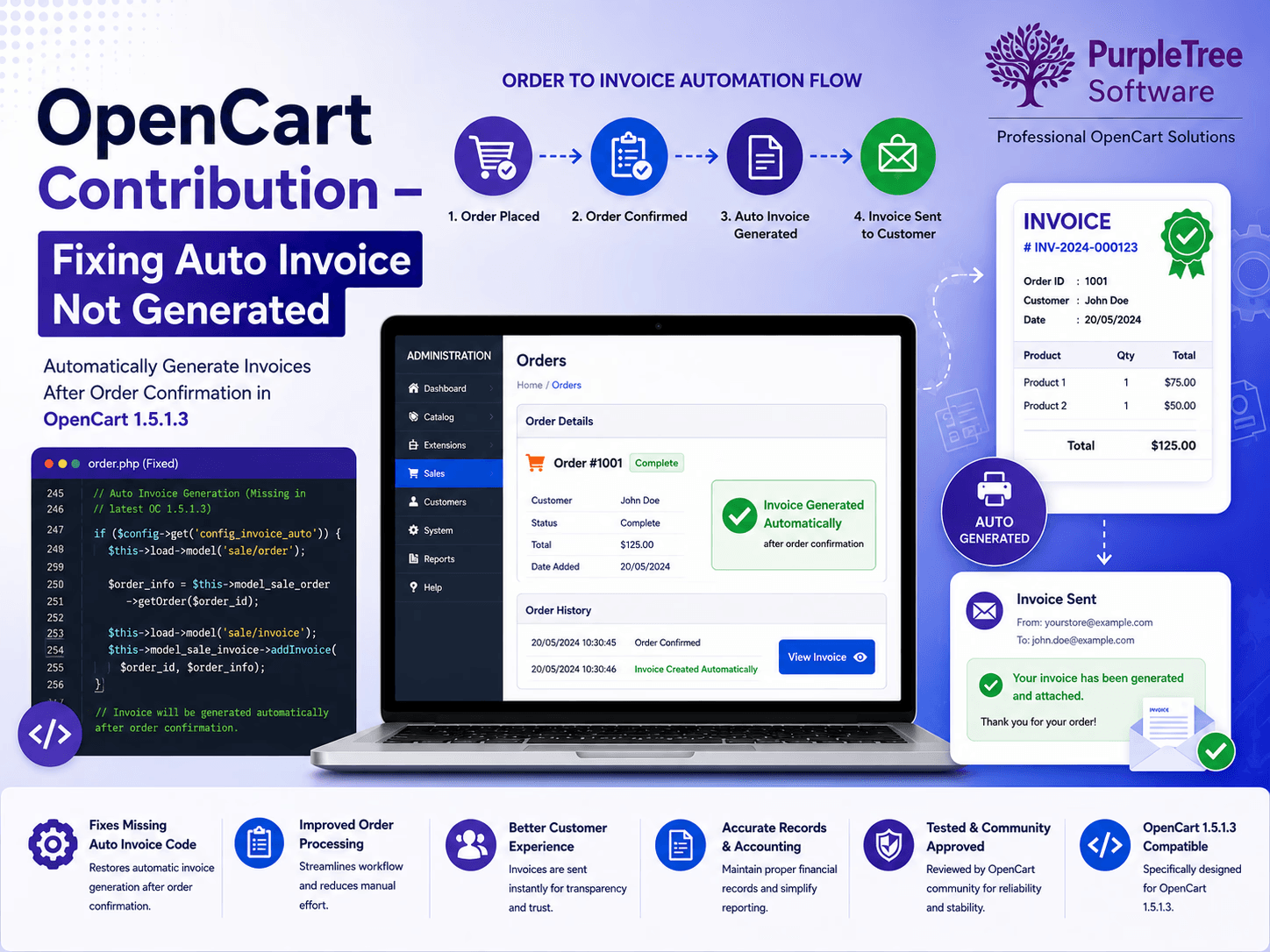
The issue, in OpenCart 1.5.1.3, is that after order confirmation, no invoice is generated for the customer.
This issue is actually due to the reason that auto invoice generation code is missing from latest version of OC.
We have fixed it and posted for benefit of community here: http://forum.opencart.com/viewtopic.php?t=48732
Let us know if you find it useful.
Why Automatic Invoice Generation Is Important
In any ecommerce store, invoices serve as an essential record of customer purchases. When an invoice is not generated automatically after order confirmation, it can create confusion for both store owners and customers. Automated invoice generation helps streamline order management, maintain accurate records, and improve the overall shopping experience.
Understanding the OpenCart Invoice Generation Issue
Some OpenCart 1.5.1.3 users discovered that invoices were not being created automatically when an order was confirmed. This behavior was caused by missing auto-invoice generation code in the platform version, preventing the invoice process from being triggered after successful order placement.
As a result, store administrators had to manually generate invoices, increasing administrative effort and the possibility of order processing delays.
Common Problems Caused by Missing Invoices
Delayed Order Processing
Without automatic invoices, order fulfillment workflows may become slower and less efficient.
Customer Communication Issues
Customers often expect an invoice immediately after completing a purchase. Missing invoices can reduce trust and create unnecessary support requests.
Accounting and Record-Keeping Challenges
Invoices are critical for financial reporting, tax documentation, and business record management.
Benefits of Applying the Community Fix
After implementing the contribution, OpenCart store owners can enjoy several benefits:
- Automatic invoice generation after order confirmation
- Improved order management workflow
- Better customer experience
- Reduced manual administration
- Enhanced ecommerce store efficiency
- More accurate order documentation
Best Practices for OpenCart Store Maintenance
To ensure smooth store operations, consider the following recommendations:
Keep Regular Backups
Always create backups before applying custom modifications or updates.
Test Changes on a Development Environment
Validate fixes in a staging environment before deploying them to a live store.
Monitor Order Processing
Regularly review order and invoice workflows to identify issues early.
Stay Updated with Community Contributions
The OpenCart community frequently shares valuable fixes and enhancements that help improve store functionality.
Why Community Contributions Matter
OpenCart has a strong developer community that continuously identifies bugs, develops solutions, and shares improvements. Community contributions help merchants overcome platform limitations and keep their stores running efficiently without waiting for major software releases.
How Automatic Invoice Generation Supports eCommerce Operations
Invoices play a critical role in every online business. They provide proof of purchase, support financial reporting, and help customers track their transactions. When invoices are generated automatically after order confirmation, businesses can reduce manual work and maintain a smoother order fulfillment process.
For growing eCommerce stores, automation becomes increasingly important because manual invoice creation can lead to delays, errors, and operational inefficiencies.
Impact of Missing Invoice Generation on Online Stores
When invoice creation does not occur automatically, several operational challenges may arise.
Increased Administrative Work
Store administrators may need to manually create invoices for every order. As order volumes increase, this process becomes time-consuming and difficult to manage.
Delays in Order Fulfillment
Many businesses use invoices as part of their order processing workflow. Missing invoices can slow down packing, shipping, and accounting procedures.
Customer Support Overhead
Customers often expect invoices immediately after completing a purchase. Missing invoices can generate additional support requests and increase response times.
Importance of Order Automation in OpenCart
Automation helps businesses streamline operations and improve efficiency.
Faster Processing
Automatically generated invoices help staff process orders more quickly by providing instant documentation.
Improved Accuracy
Automated workflows reduce the risk of human error and ensure that invoices are created consistently for every order.
Better Customer Experience
Customers receive transaction records promptly, improving trust and confidence in the online store.
Key Benefits of Implementing the OpenCart Fix
After applying the contribution, merchants can benefit from:
- Automatic invoice generation after order confirmation
- Reduced manual administrative effort
- Faster order processing workflows
- Improved customer communication
- Better accounting and record keeping
- Consistent order documentation
- Enhanced store efficiency
These benefits contribute to smoother day-to-day operations and improved customer satisfaction.
How Community Contributions Strengthen OpenCart
One of OpenCart’s greatest strengths is its active developer community.
Faster Problem Resolution
Community developers frequently identify issues and provide practical solutions before official platform updates are released.
Continuous Platform Improvement
Contributions help improve:
- Performance
- Security
- User experience
- Administrative functionality
Cost-Effective Enhancements
Many community fixes and extensions provide valuable functionality without requiring extensive custom development.
Best Practices Before Applying OpenCart Modifications
Create Full Backups
Always back up:
- Database
- Application files
- Custom modifications
This ensures you can quickly restore your store if needed.
Use a Testing Environment
Apply fixes on a staging or development environment before updating your live store.
Verify Compatibility
Confirm that modifications are compatible with:
- OpenCart version
- Installed extensions
- Custom themes
This helps prevent conflicts and unexpected issues.
Maintaining a Healthy OpenCart Store
Regular Updates
Keeping your store updated helps improve:
- Security
- Performance
- Compatibility
Monitor Order Workflows
Regularly review:
- Order statuses
- Invoice generation
- Payment processing
- Shipping workflows
This helps identify issues before they impact customers.
Review Error Logs
OpenCart error logs can provide valuable information about hidden system issues that may affect store operations.
Why Invoice Automation Matters for Business Growth
As order volume grows, manual processes become increasingly difficult to manage.
Invoice automation helps businesses:
- Scale operations efficiently
- Improve internal productivity
- Reduce administrative costs
- Support accurate financial reporting
Automated systems create a stronger foundation for long-term growth.
OpenCart as a Flexible eCommerce Platform
OpenCart continues to be a popular choice because of its:
- Open-source flexibility
- Large extension ecosystem
- Active community support
- Customization capabilities
The availability of community contributions such as this invoice generation fix demonstrates the strength of the OpenCart ecosystem.
Frequently Asked Questions
Why are invoices important in eCommerce?
Invoices provide proof of purchase, support accounting processes, and improve customer confidence in online transactions.
What caused the auto invoice issue in OpenCart 1.5.1.3?
The issue occurred because the invoice generation code was missing from the order confirmation workflow.
Can missing invoices affect customer satisfaction?
Yes. Customers often expect immediate invoice generation after completing a purchase. Missing invoices may create confusion and support requests.
Should OpenCart modifications be tested before deployment?
Absolutely. Testing in a development environment helps identify compatibility issues and minimizes risks to live stores.
Conclusion
The auto invoice generation issue in OpenCart 1.5.1.3 highlights the importance of community-driven development and continuous platform improvement. By applying the contribution, store owners can restore invoice automation, improve operational efficiency, reduce administrative overhead, and provide a better customer experience. OpenCart’s active developer community continues to help businesses maximize the potential of their online stores through practical enhancements and valuable contributions.