Magento Extensions

Restrict User Login

This extension is useful when a customer is to be banned or blocked from the Magento store. User is shown normal login failure message after restriction takes place, and would not be able to log in. It also works from the customer grid for making login restrictions in bulk.
$59 $99 One-time payment
SKU : restrict-user-login
Add-On:
Share :
(4)
Trusted by 5000+ Stores
Lifetime Updates
6 Months Support

Description

Magento 2 Restrict User Login Extension

The Magento 2 Restrict User Login Extension allows store administrators to block or restrict specific customers from logging into the store.

This extension is useful when you need to ban suspicious, abusive, or unwanted users from accessing your Magento store.

Admins can easily restrict single or multiple customers directly from the customer grid. Once restricted, the customer will see a normal login failure message and will not be able to log in to the store.

The extension is simple to configure and can be enabled or disabled anytime from the Magento admin configuration.

Includes

  • Lifetime Updates
  • Full Source Code
  • One-Time Payment
  • 6 Months Support

Quick Highlights (Most Important Points)

✔ Block or Ban Specific Customers from logging into your store.

✔ Restrict Single or Multiple Users directly from customer grid.

✔ Normal Login Failure Message shown to restricted users.

✔ Easy Enable / Disable from Magento configuration.

Complete User Guide

View the complete user guide for:

Restrict User Login

Description of Restrict User Login

This extension is useful when a customer needs to be banned or blocked from the Magento store. The user is shown a normal login failure message after restriction takes place and will not be able to log in.

Magento 2 Restrict User Login Extension – Block and Manage Customer Access Efficiently
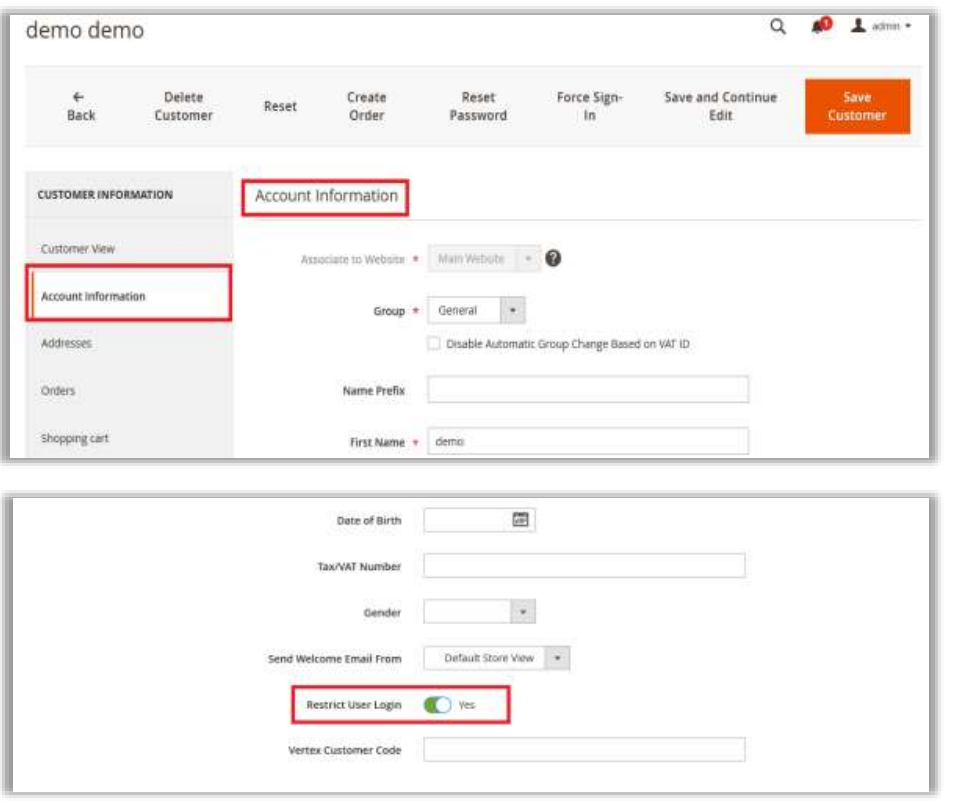
  • Purpose of the Extension: The "Restrict User Login" extension allows admins to blacklist or restrict customer logins on the website.
  • Restricting a Single Customer: Admins can block a specific customer by editing their profile and enabling the "Restrict User Login" attribute.
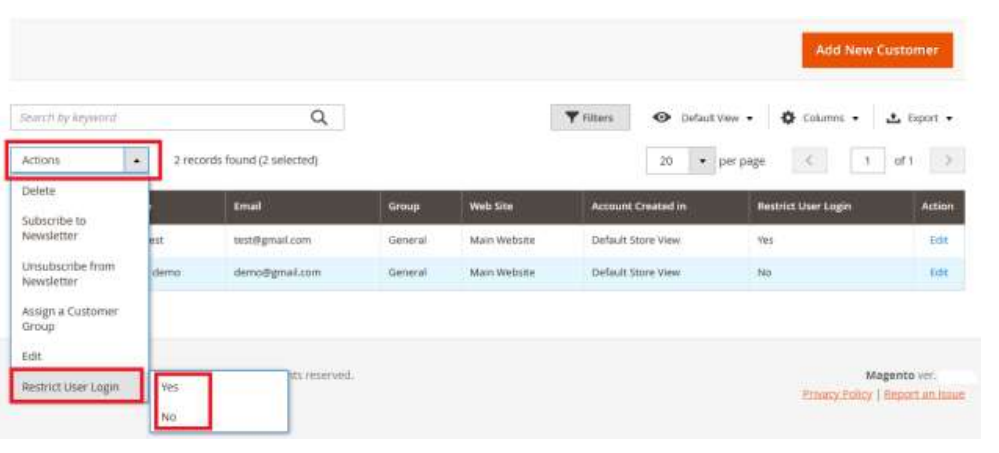
  • Restricting Multiple Customers: Admins can select multiple customers from the customer grid and restrict them using the "Restrict User Login" action.
  • Checking Restricted Customers: A "Restrict User Login" column is available in the customer grid to display all restricted customers.
  • Unblocking Customers: Admins can unblock restricted customers by selecting them from the grid and changing the restriction status to "No."
  • Disabling the Extension: The extension can be disabled from  Admin → Stores → Configuration → Purpletree → Restrict User Login, which removes all its features from the customer grid and forms.

Blocking Single User

Restrict User Login 1
Restrict User Login 2

Blocking Multiple Users

Our Support, Guide & Policies

Download the User Guide .

In case of any issues, please open a ticket from our Helpdesk .

Note: Our extensions have a licensing policy. Click here to view the full License Policy .

Features

Magento 2 Restrict User Login Extension

Block Specific Customers

Admins can block individual customers by enabling the Restrict User Login attribute in the customer profile.

Restrict Multiple Customers

Multiple customers can be restricted at once using bulk actions from the customer grid.

Customer Grid Restriction Column

A dedicated Restrict User Login column shows which customers are restricted.

Normal Login Failure Message

Restricted users will see a normal login failure message, keeping the restriction hidden.

Easy Enable / Disable

The extension can be enabled or disabled easily from Magento configuration settings.

Quick Customer Management

Admins can quickly restrict or unblock customers directly from the admin panel.

Unblock Customers Anytime

Restricted customers can be unblocked easily by changing the restriction status.

Simple and Lightweight

The extension is easy to install, configure, and manage.

Benefits

Value for Everyone

Benefits for Admin

  • Easily block suspicious or unwanted customers
  • Manage customer login permissions quickly
  • Restrict single or multiple customers easily
  • Monitor restricted customers through the customer grid
  • Maintain better store security and control

Benefits for Customers

  • Helps maintain a secure and trustworthy shopping environment
  • Prevents misuse or abuse of customer accounts
  • Improves overall store reliability and safety
Live Demo

See It In Action

Restrict User Login Demo Credentials

Admin Demo

username: demo_admin

password: demoadmin123
Compatibility

Supported Versions

Supported Versions

2.2.x 2.3.x 2.4.x 2.4.4 2.4.5 2.4.6 2.4.7 2.4.8
FAQ

Frequently Asked Questions

It allows admins to block specific customers from logging into the Magento store.

Yes, you can block a specific customer directly from the customer edit page.

Yes, admins can select multiple customers from the customer grid and restrict them together.

Yes, admins can remove the restriction anytime from the customer grid.

No, they will see a normal login failure message when trying to log in.

Yes, it can be disabled anytime from Magento configuration settings.
Customer Reviews

What Our Customers Say

My Cart Cart Page

We may use cookies or any other tracking technologies when you visit our website, including any other media form, mobile website, or mobile application related or connected to help customize the Site and improve your experience. Read Full Cookies